🎅Profitez de 20 % de réduction sur tout le site — utilisez le code 25XMAS🎅 Shop now
Livraison gratuite pour les commandes de plus de €50
Cart 0
  • Designed for MagSafe
    • All MagSafe Products
      • Wireless Charging
      • Car Charger & Mounts
      • Charging Stands
      • MagSafe Cases
      • MagSafe Wallets
      • Power Banks
      • MagSafe Rings & Wall Mounts
      • Best MagSafe Bundles
    • Magsafe in Life
      • Desk Charging
      • Shop Auto
      • Travel Essentials
      • Workspace Power
      • Find My Technology
      • Gift Guide
  • Protection By Device
    • All Cases
      • iPhone🔥
      • iPad🔥
      • Airpods🔥
      • Samsung
    • Screen Protection
      • iPhone
      • iPad🔥
      • Apple Watch🔥
      • Samsung
    • iPad Productivity
      • Keyboards🔥
      • Styluses
    • Accessories
      • All Accessories
      • iPhone 17🔥
      • iPhone 17 Pro Max🔥
      • iPhone 17 Pro🔥
      • iPhone Air🔥
      • iPhone 17🔥
      • iPhone 16
      • iPhone 16e
      • iPhone 16 Pro Max
      • iPhone 16 Pro
      • iPhone 16 Plus
      • iPhone 16
      • iPhone 15
      • iPhone 15 Pro Max
      • iPhone 15 Pro
      • iPhone 15 Plus
      • iPhone 15
      • iPhone 14
      • iPhone 14 Pro Max
      • iPhone 14 Pro
      • iPhone 14 Plus
      • iPhone 14
      • iPhone 13
      • iPhone 13 Pro Max
      • iPhone 13 Pro
      • iPhone 13
        Choose Your Device
      • iPad Pro 13 (2025)🔥
      • iPad Pro 11 (2025)🔥
      • iPad 11th Gen (2025)
      • iPad Air 13 (2025)
      • iPad Air 11 (2025)
      •  
      • iPad Pro 13 (2024)
      • iPad Pro 11 (2024)
      • iPad Air 13 (2024)
      • iPad Air 11 (2024)
      • iPad mini 7 (2024)
      •  
      • iPad Pro 12.9 (2022)
      • iPad Pro 11 (2022)
      • iPad Air 5/4 (2022)
      • iPad 10th Gen (2022)
      •  
      • iPad mini 6 (2021)
      • iPad Pro 12.9 (2021)
      • iPad Pro 11 (2021)
      • iPad Pro 11 (2020)
        Choose Your Device
      • AirPods Pro 3🔥
      • AirPods 4
      • AirPods Pro (2023/2022/2019)
      • AirPods 3
        Galaxy S25
      • Galaxy S25 Ultra
      • Galaxy S25+
      • Galaxy S24
      • Galaxy S24 Ultra
      • Galaxy S24+
      • Galaxy S24
      • Galaxy S23
      • Galaxy S23 Ultra
      • Galaxy S23
        iPhone 17🔥
      • iPhone 17 Pro Max🔥
      • iPhone 17 Pro🔥
      • iPhone Air🔥
      • iPhone 17🔥
      • iPhone 16
      • iPhone 16e
      • iPhone 16 Pro Max
      • iPhone 16 Pro
      • iPhone 16 Plus
      • iPhone 16
      • iPhone 15
      • iPhone 15 Pro Max
      • iPhone 15 Pro
      • iPhone 15 Plus
      • iPhone 15
      • iPhone 14
      • iPhone 14 Pro Max
      • iPhone 14 Pro
      • iPhone 14 Plus
      • iPhone 14
      • iPhone 13
      • iPhone 13 Pro Max
      • iPhone 13/13 Pro
        Choose Your Device
      • iPad Pro 13 (2025)🔥
      • iPad Pro 11 (2025)🔥
      • iPad 11th Gen (2025)
      • iPad Air 13 (2025)
      • iPad Air 11 (2025)
      •  
      • iPad Pro 13 (2024)
      • iPad Pro 11 (2024)
      • iPad Air 13 (2024)
      • iPad Air 11 (2024)
      •  
      • iPad Pro 12.9 (6th/5th/4th/3rd Gen)
      • iPad Pro 11 (4th/3rd/2nd/1st Gen)
      • iPad Air 5/4 (2022)
      • iPad 10th Gen (2022)
      •  
         
      • Apple Watch🔥
        Galaxy S25
      • Galaxy S25 Ultra
      • Galaxy S24
      • Galaxy S24 Ultra
      • Galaxy S23
      • Galaxy S23 Ultra
      • Galaxy S23+
      • Galaxy S23
      • Galaxy S22
      • Galaxy S22 Ultra
        Choose Your Device
      • iPad Pro 13 (2025)🔥
      • iPad Pro 11 (2025)🔥
      • iPad 11th Gen (2025)
      • iPad Air 13 (2025)
      • iPad Air 11 (2025)
      •  
      • iPad Pro 13 (2024)
      • iPad Pro 11 (2024)
      • iPad Air 13 (2024)
      • iPad Air 11 (2024)
      •  
      • iPad Pro 12.9 (6th/5th/4th/3rd)
      • iPad Pro 11 (4th/3rd/2nd/1st)
      • iPad Air 5/4 (2022)
      • iPad 10th Gen (2022)
         
      • Styluses
         
      • Magnetic Wallet
      • MagSafe Rings & Mounts
      • Other Accessories
  • 🎄Christmas Sale🎄
  • New Arrival
    • iPad Pro 2025🔥
    • iPhone 17 Series🔥
    • AirPods Pro 3🔥
    • 15W Qi2 Wireless Charging
    • iPad 2025 Series
  • Super User
    • Become an ESR Super User
    • Members’ Exclusive Deals
    • Refer Friends for CashBack
    • My Orders
  • Support
    • Contact Us
    • Product Videos & FAQs
    • General FAQ
    • Order Status
    • Return and Refund Policy
    • Warranty Policy
    • Shipping Policy
  • Explore
    • About Us
    • ESR Blog
    • Newsroom
    • Become a Reseller
My Account
Log in Register
North America
Europe
Asia Pacific
Middle East
United States
🌐 International
Austria
EUR €
Belgium
EUR €
Bulgaria
EUR €
Croatia
EUR €
Czechia
EUR €
Denmark
EUR €
Estonia
EUR €
Finland
EUR €
France
EUR €
Germany
EUR €
Greece
EUR €
Hungary
EUR €
Ireland
EUR €
Italy
EUR €
Latvia
EUR €
Lithuania
EUR €
Luxembourg
EUR €
Netherlands
EUR €
Norway
EUR €
Poland
EUR €
Portugal
EUR €
Romania
EUR €
Slovakia
EUR €
Slovenia
EUR €
Spain
EUR €
Sweden
EUR €
Switzerland
EUR €
français
Deutsch
English
  • Designed for MagSafe
    • All MagSafe Products
      • Wireless Charging
      • Car Charger & Mounts
      • Charging Stands
      • MagSafe Cases
      • MagSafe Wallets
      • Power Banks
      • MagSafe Rings & Wall Mounts
      • Best MagSafe Bundles
    • Magsafe in Life
      • Desk Charging
      • Shop Auto
      • Travel Essentials
      • Workspace Power
      • Find My Technology
      • Gift Guide
    • Wireless Charging
      • OmniLock Magnetic Car Charger (25W, CryoBoost, Air Vent) - Black

      • CryoBoost 3-in-1 Magnetic Charging Station (25W, Qi2.2) - EU Plug–Black

      • 15W Wireless Car Charger with CryoBoost (HaloLock) - Black

      • 25W 3-in-1 Wireless Charger with MagSafe + CryoBoost - US Plug

      • All Wireless Charging >
      Car Charger & Mounts
      • OmniLock Magnetic Car Charger (25W, CryoBoost, Air Vent) - Black

      • 15W Wireless Car Charger with CryoBoost (HaloLock) - Black

      • OmniLock Magnetic Car Mount (Suction Cup) - Black

      • 15W Magnetic Wireless Car Charger(Halolock) - Black

      • All Car Charger & Mounts >
      Charging Stands
      • CryoBoost 3-in-1 Magnetic Charging Station (25W, Qi2.2) - EU Plug–Black

      • OmniLock Magnetic Car Charger (25W, CryoBoost, Air Vent) - Black

      • 15W 3-in-1 Travel Wireless Charging Set (Bag Included) - White - EU Plug

      • 3-in-1 Magnetic Charging Station (15W)- Black - EU PLUG

      • All Charging Stands >
      MagSafe Cases
      • iPhone 17 Pro Max Classic Hybrid Magnetic Case (Camera Control, Stash Stand) - Clear

      • iPhone 17 Pro Max Bundle Classic Hybrid Magnetic Case (Camera Control, Stash Stand) and Armorite Pro Screen Protector - Clear

      • iPhone 17 Pro Max Bundle Classic Hybrid Magnetic Case (Camera Control, Stash Stand) and Armorite Screen Protector - Frosted Orange

      • iPhone 17 Pro Max Bundle Classic Hybrid Magnetic Case (Camera Control, Stash Stand) and Armorite Privacy Screen Protector - Frosted Bubblegum Pink

      • All MagSafe Cases >
      MagSafe Wallets
      • Geo Magnetic Wallet Stand (Grip) - Midnight Black

      • Geo Wallet Boost (HaloLock) - Black

      • Classic Magnetic Wallet Stand for 5 cards - Black Carbon Fiber

      • Magnetic Wallet Boost (HaloLock) - Black

      • All MagSafe Wallets >
      Power Banks
      • HaloLock MagSlim Wireless Power Bank (15W, 10,000 mAh, Kickstand) - Black

      • Qi2 MagSlim Power Bank (5K) - Black

      • All Power Banks >
      MagSafe Rings & Wall Mounts
      • Universal Ring (HaloLock) - Black/Silver-4 Pack

      • Universal Ring 360 (HaloLock) - White-2 Pack

      • All MagSafe Rings & Wall Mounts >
      Best MagSafe Bundles
      • Magsafe Charger One-Stop Bundle - Black/White - EU Plug

      • MagSafe Charger with CryoBoost Everyday Bundle - EU Plug

      • iPhone 16 Pro Everyday-Carry Bundle - Clear

      • iPhone 16 Pro Max Everyday-Carry Bundle - Clear

      • All Best MagSafe Bundles >
      Desk Charging
      • CryoBoost 3-in-1 Magnetic Charging Station (25W, Qi2.2) - EU Plug–Black

      • 25W 3-in-1 Wireless Charger with MagSafe + CryoBoost - EU Plug

      • Qi2 3-in-1 Wireless Charging Station with CryoBoost (HaloLock) - Black - EU Plug

      • Magnetic Charging Pad (15W, Kickstand) - Dark Blue

      • All Desk Charging >
      Shop Auto
      • OmniLock Magnetic Car Charger (25W, CryoBoost, Air Vent) - Black

      • 15W Wireless Car Charger with CryoBoost (HaloLock) - Black

      • OmniLock Magnetic Car Mount (Suction Cup) - Black

      • 15W Magnetic Wireless Car Charger(Halolock) - Black

      • All Shop Auto >
      Travel Essentials
      • OmniLock Magnetic Car Charger (25W, CryoBoost, Air Vent) - Black

      • 15W 3-in-1 Travel Wireless Charging Set (Bag Included) - Black - EU Plug

      • Geo Magnetic Wallet Stand (Grip) - Midnight Black

      • Geo Wallet Boost (HaloLock) - Black

      • All Travel Essentials >
      Workspace Power
      • iPad Air 11” (2025) Rebound Magnetic Keyboard Case 360 - US Layout-Black

      • iPad 11" (A16) 2025 Flex Keyboard Case (Detachable) - US Layout-Pink

      • iPad Pro 13" (2024) Shift Keyboard Case (Detachable) - US Layout - Dark Gray

      • iPad 11" (A16, 2025) Rebound Magnetic Keyboard Case - US Layout-Black

      • All Workspace Power >
      Find My Technology
      • Geo Card Holder - Black Carbon Fiber

      • Geo Digital Pencil with Built-in Find My - White

      • Geo Magnetic Wallet Stand (Grip) - Midnight Black

      • Geo Wallet with Find My - Black Carbon Fiber

      • All Find My Technology >
      Gift Guide
      • iPhone 17 Pro Max Classic Hybrid Magnetic Case (Camera Control, Stash Stand) with Wallet Stand Bundle - Clear

      • Geo Wallet Boost (HaloLock) - Brown

      • 15W 3-in-1 Travel Wireless Charging Set - White - US Plug

      • iPhone 17 Pro Max Bundle Cyber Tough Magnetic Case (Camera Control, Stash Stand) and Magnetic Charging Pad (Qi2) - Orange

      • All Gift Guide >
  • Protection By Device
    • All Cases
      • iPhone🔥
      • iPad🔥
      • Airpods🔥
      • Samsung
    • Screen Protection
      • iPhone
      • iPad🔥
      • Apple Watch🔥
      • Samsung
    • iPad Productivity
      • Keyboards🔥
      • Styluses
    • Accessories
      • All Accessories
      • iPhone 17🔥
      • iPhone 17 Pro Max🔥
      • iPhone 17 Pro🔥
      • iPhone Air🔥
      • iPhone 17🔥
      • iPhone 16
      • iPhone 16e
      • iPhone 16 Pro Max
      • iPhone 16 Pro
      • iPhone 16 Plus
      • iPhone 16
      • iPhone 15
      • iPhone 15 Pro Max
      • iPhone 15 Pro
      • iPhone 15 Plus
      • iPhone 15
      • iPhone 14
      • iPhone 14 Pro Max
      • iPhone 14 Pro
      • iPhone 14 Plus
      • iPhone 14
      • iPhone 13
      • iPhone 13 Pro Max
      • iPhone 13 Pro
      • iPhone 13
        Choose Your Device
      • iPad Pro 13 (2025)🔥
      • iPad Pro 11 (2025)🔥
      • iPad 11th Gen (2025)
      • iPad Air 13 (2025)
      • iPad Air 11 (2025)
      •  
      • iPad Pro 13 (2024)
      • iPad Pro 11 (2024)
      • iPad Air 13 (2024)
      • iPad Air 11 (2024)
      • iPad mini 7 (2024)
      •  
      • iPad Pro 12.9 (2022)
      • iPad Pro 11 (2022)
      • iPad Air 5/4 (2022)
      • iPad 10th Gen (2022)
      •  
      • iPad mini 6 (2021)
      • iPad Pro 12.9 (2021)
      • iPad Pro 11 (2021)
      • iPad Pro 11 (2020)
        Choose Your Device
      • AirPods Pro 3🔥
      • AirPods 4
      • AirPods Pro (2023/2022/2019)
      • AirPods 3
        Galaxy S25
      • Galaxy S25 Ultra
      • Galaxy S25+
      • Galaxy S24
      • Galaxy S24 Ultra
      • Galaxy S24+
      • Galaxy S24
      • Galaxy S23
      • Galaxy S23 Ultra
      • Galaxy S23
        iPhone 17🔥
      • iPhone 17 Pro Max🔥
      • iPhone 17 Pro🔥
      • iPhone Air🔥
      • iPhone 17🔥
      • iPhone 16
      • iPhone 16e
      • iPhone 16 Pro Max
      • iPhone 16 Pro
      • iPhone 16 Plus
      • iPhone 16
      • iPhone 15
      • iPhone 15 Pro Max
      • iPhone 15 Pro
      • iPhone 15 Plus
      • iPhone 15
      • iPhone 14
      • iPhone 14 Pro Max
      • iPhone 14 Pro
      • iPhone 14 Plus
      • iPhone 14
      • iPhone 13
      • iPhone 13 Pro Max
      • iPhone 13/13 Pro
        Choose Your Device
      • iPad Pro 13 (2025)🔥
      • iPad Pro 11 (2025)🔥
      • iPad 11th Gen (2025)
      • iPad Air 13 (2025)
      • iPad Air 11 (2025)
      •  
      • iPad Pro 13 (2024)
      • iPad Pro 11 (2024)
      • iPad Air 13 (2024)
      • iPad Air 11 (2024)
      •  
      • iPad Pro 12.9 (6th/5th/4th/3rd Gen)
      • iPad Pro 11 (4th/3rd/2nd/1st Gen)
      • iPad Air 5/4 (2022)
      • iPad 10th Gen (2022)
      •  
         
      • Apple Watch🔥
        Galaxy S25
      • Galaxy S25 Ultra
      • Galaxy S24
      • Galaxy S24 Ultra
      • Galaxy S23
      • Galaxy S23 Ultra
      • Galaxy S23+
      • Galaxy S23
      • Galaxy S22
      • Galaxy S22 Ultra
        Choose Your Device
      • iPad Pro 13 (2025)🔥
      • iPad Pro 11 (2025)🔥
      • iPad 11th Gen (2025)
      • iPad Air 13 (2025)
      • iPad Air 11 (2025)
      •  
      • iPad Pro 13 (2024)
      • iPad Pro 11 (2024)
      • iPad Air 13 (2024)
      • iPad Air 11 (2024)
      •  
      • iPad Pro 12.9 (6th/5th/4th/3rd)
      • iPad Pro 11 (4th/3rd/2nd/1st)
      • iPad Air 5/4 (2022)
      • iPad 10th Gen (2022)
         
      • Styluses
         
      • Magnetic Wallet
      • MagSafe Rings & Mounts
      • Other Accessories
  • 🎄Christmas Sale🎄
  • New Arrival
    • iPad Pro 2025🔥
    • iPhone 17 Series🔥
    • AirPods Pro 3🔥
    • 15W Qi2 Wireless Charging
    • iPad 2025 Series
  • Super User
    • Become an ESR Super User
    • Members’ Exclusive Deals
    • Refer Friends for CashBack
    • My Orders
  • Support
    • Contact Us
    • Product Videos & FAQs
    • General FAQ
    • Order Status
    • Return and Refund Policy
    • Warranty Policy
    • Shipping Policy
  • Explore
    • About Us
    • ESR Blog
    • Newsroom
    • Become a Reseller
Account Cart 0
North America
Europe
Asia Pacific
Middle East
United States
🌐 International
Austria
EUR €
Belgium
EUR €
Bulgaria
EUR €
Croatia
EUR €
Czechia
EUR €
Denmark
EUR €
Estonia
EUR €
Finland
EUR €
France
EUR €
Germany
EUR €
Greece
EUR €
Hungary
EUR €
Ireland
EUR €
Italy
EUR €
Latvia
EUR €
Lithuania
EUR €
Luxembourg
EUR €
Netherlands
EUR €
Norway
EUR €
Poland
EUR €
Portugal
EUR €
Romania
EUR €
Slovakia
EUR €
Slovenia
EUR €
Spain
EUR €
Sweden
EUR €
Switzerland
EUR €
français
Deutsch
English

Search our store

Account Cart 0
Popular Searches:
iPad 2025 iPhone 16 camera control Qi2 Wireless Charging Magnetic Wallet
How To

How to Fix iPhone Storage Full? (10 ways)

by Adam on Jul 27, 2020
How to Fix iPhone Storage Full

If you are about to take a beautiful picture and suddenly a dreadful message of storage full appears on your iPhone screen – we are sure you will feel frustrated whenever you have to delete your previous picture to free up some space on your iPhone.

Don’t worry! You can now free up some space on your iPhone without deleting your beautiful memories. Here we have figured out some ways to manage your iPhone storage full issues. If you follow these ways correctly, you can enjoy sufficient storage without any concerns about running out of iPhone’s space.

  1. Keep your photos in iCloud Photo Library

Videos and pictures take a lot of storage space. You can use the iCloud Photo Library that lets you store all your pictures by freeing up some storage space.

Using the iCloud Photo Library for optimizing the storage features of the iPhone enables you to make some space by uploading the older photos on the iCloud account. This will not consume your storage space, and you can re-download the photos whenever you want. Follow out following steps:

  • Tap on “Settings”.Choose “Photos and Camera”.
  • Turn on “iCloud Photo Library”.
  • Make sure to select the option of “Optimize Phone Storage” on your iPhone.

Keep your photos in iCloud Photo Library

Note:  Keep in mind that iCloud may take some time to finish uploading your photos and to re-index your photos app.

  1.  Delete Unused and Pre-installed apps

We all download different apps on our devices for a single-use and then forget to remove those unused apps. Furthermore, there are some apps that have already been installed by Apple like Stocks, Remote, and Compass. Apple is now giving its users the option to delete pre-installed apps if they want to do so. It’s a great way to make enough space on your phone. To delete an app, follow these steps:

  • Press on the app’s icon on the home screen until it starts jiggling.
  • Tap “×” on the left side of the icon to delete an app.

Delete Unused and Pre-installed apps

  1.  Figure out which app is taking a lot of space

Some apps gobble up a lot of memory on the iPhone. Many people usually don’t have any idea about how much space a particular app is taking. To find out the amount of space taken by different apps:

  • Go to “Settings”. Tap “General” and then “Storage and iCloud Usage”.
  • Tap “Manage Storage”.This will give you an overview of different apps taking how much space in your phone.

Figure out which app is taking a lot of space

If an unused app is utilizing much space, delete it since you don’t need it. If a specific small app is taking up much space, you can free up some space by deleting the data linked with that app.

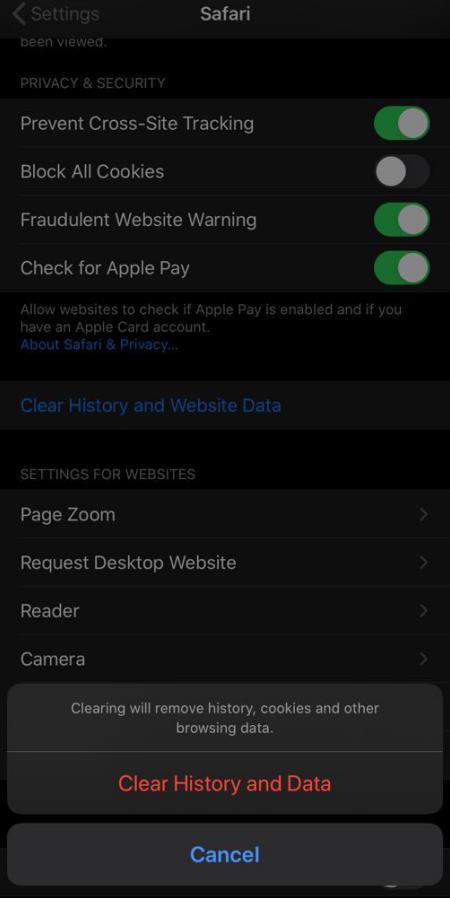
  1. Clear out your browsing data

Browsing history and some other files are saved by internet browsers such as Chrome, Internet Explorer and Safari, etc. to make internet experience seamless. If you use a browser frequently, then these extra files will definitely take up considerable storage. In order to clean up the browser caches to get enough storage on your iPhone, follow these steps:

  • Go to “Settings”.Tap on the browser, which you use most frequently.
  • Tap “Clear History and Website Data”.

Clear out your browsing data

Note: Clearing browsing caches will close all your tabs, so make sure to bookmark any needed websites before cleaning up.

  1. Use pCloud to listen to your favorite music

You want to keep your favorite tracks on your phone but you are upset because you don’t have enough space for it. Right? Why not upload all your favorite music and listen to it when you want by using the pCloud app?

Use pCloud to listen to your favorite music

If you are a true music lover with an extensive collection of tracks, this app can be a perfect storage saver for you. You will get a 10 GB of free space when you sign up for the first time in pCloud.

  1. Delete offline data from your iPhone

iPhone saves website data and browser (like safari) reading list for convenient viewing when you are not connected to the internet. It definitely takes up some storage on your device. If you want to clear your reading list, follow these steps:

  • Go to “Settings” and then “General”.
  • Tap on “Manage storage” and then the name of your browser like “Safari”.
  • Tap on “Offline Reading List”, and then press“Delete”.
  1. Delete your old messages

Text conversations may take much storage on your phone, especially if you are receiving a lot of pictures. To free up enough space on your iPhone, go to your old conversations and delete as many of them as you want. You can also command your iOS to purge messages after a particular duration. For this follow these steps:

  • Go to “Settings” then “Messages”.
  • Tap on “Messages History” and then tap “Keep Messages”.
  • Select a certain length of time. Older messages will be purged automatically.

Delete your old messages

  1. Use Standard Definition Picture Resolution

Remember not to keep all your photos in High Definition Resolution (HDR). These photos take up an ample space making your iPhone storage full within no time. Standard Definition is usually sufficient unless you really need a high picture resolution photo. To make sure you are not consuming much space while clicking HDR photos every time, follow these steps:

  • Go to “Settings” then “Photos and Camera”.
  • Set the  “Format” option that takes up less space, i.e. “Most Compatible”.

 Use Standard Definition Picture Resolution

  1. Backup you files to Cloud

iCloud-based storage is specifically designed for iPhone for optimizing your storage space. You can backup your large files here. You can enjoy 5GB of storage after setting up iCloud. After backing up your important documents, pictures and videos, you can now delete them from your iPhone as they will still remain in iCloud. This will create sufficient storage for the proper functioning of your device.

Backup you files to Cloud

  1. Remove your iPhone Backup

In the case of full storage in iCloud, you will get full storage notification on your phone even if you have deleted some large files to make some space on your iPhone. To solve this issue, follow these steps:

  • Go to “Settings”.Tap your iCloud ID at the top of the screen.
  • Tap “iCloud” and then “Manage Storage”.
  • Tap “Backups” and then “Delete Backups”.

Remove your iPhone Backup

Conclusion

Running out of space is really very annoying in critical situations. You can solve your full storage issues by implementing these ways and keep using your iPhone without any troubles.

  • iphone 14
Previous
How to Speed up Your Macbook Pro? (Make Your Mac Run Faster)
Next
How to Sync your iPhone to Macbook?

Related Articles

keep iPhone Battery health

The Great Wireless Charging Debate: Is It Really Harming Your iPhone Battery?

Why Keyboard Cases matter for College Students?

The Ultimate Student Guide to Choosing the Best iPad Pro Keyboard Case for College

How to Take a Screenshot on iPhone: Apple’s Hidden Tricks Revealed?

How to Take a Screenshot on iPhone: Apple’s Hidden Tricks Revealed?

When Is the Right Time to Buy a New iPad in 2025 and Beyond?

When Is the Right Time to Buy a New iPad in 2025 and Beyond?

Leave a Comment

Your email address will not be published.

Recent Post

esr anti-yellowing clear tpu case line
What is a TPU Phone Case? ESR's Model Tested for Protection & Clarity
by Javeria Salam on November 05, 2025
The best iPad Pro cases of 2025: Expert tested and reviewed
Which iPad Pro 13 Case is good for you : Zugu vs. Moft vs. ESR
by Adam on September 16, 2025
Best Cases for iPhone 17
Best Cases for iPhone 17: Which Wins— OtterBox, ESR, Apple, or Casetify?
by Nicky on September 29, 2025
best 5 magsafe iphone 17 cases
Looking for Custom iPhone Cases for New iPhone - Top 4 Options
by Carolin on September 24, 2025
6-best-iPad-Air-11-inch-Cases-With-Pencil-Holder-in-2025
6 best iPad Air 11-inch Cases With Pencil-Holder in 2025
by Sandy on April 02, 2025
The-Best-iPhone-Cases-with-Camera-Control-Button-for-iPhone-16-16-Plus-16-Pro-and-16-Pro-Max
The Best iPhone Cases with Camera Control Button for iPhone 16, 16 Plus, 16 Pro, and 16 Pro Max
by Javeria Salam on April 02, 2025

Instagram

Entreprise

  • About Us
  • Our Blog
  • Newsroom
  • Become a Reseller

Produits

  • Designed for MagSafe
  • Protective Phone Cases
  • iPad Cases
  • Screen Protectors
  • Wireless Charging
  • Productivity
  • Magnetic Wallets
  • Other Accessories

Communauté

  • My Account
  • Affiliate Program

Assistance

  • Contact Us
  • Setup Videos & FAQs
  • Order Status
  • Return and Refund
  • Warranty Policy
  • Shipping Policy
  • Payment Methods

Payment options:
  • American Express
  • Diners Club
  • Discover
  • JCB
  • Mastercard
  • PayPal
  • Visa
  • Klarna Klarna
  • Afterpay
© 2025 ESR All rights reserved.
  • Terms of Use
  • Privacy Policy
  • Legal Declaration
  • Cookie Policy
  • Shipping Policy
  • Return and Refund
  • Search

Shopping Cart

Get a 15% off coupon when you

sign up

for free shipping!

€38,00
You're €38,00 away from Free Shipping!

€50,00
You're €50,00 away from Free Shipping!

Your Cart is Empty

Sign In / Register to view saved cart items
Shop Now
ESR_IMG

ESR_IMG

ESR_IMG

ESR_IMG

Subtotal €0,00
View Cart

Thank you for choosing to transfer to a human service.

Sorry! The previous responses were from our AI customer service. Since it didn't satisfy you, you've been transferred to a human agent. We'll reply within 24 hours from Mon to Fri and 48 hours on weekends for further help.

Please select the reason for transfer