


If you use an Apple Pencil alongside your iPad, you already know the problem: the stylus slips off, rolls away, or ends up at the bottom of your bag — scratched or dead. A well-designed iPad case with a built-in Apple Pencil holder solves this. It keeps your Pencil magnetically attached, charged, and ready without adding unnecessary bulk.
This guide covers everything you need to know to choose the right case in 2026, from matching your iPad model to finding the case style that fits your daily routine. It’s built to stay useful year after year — we update the model-specific sections each year. At the same time, the buying advice and brand background remain relevant regardless of which generation you’re on.
Why an iPad Case with Pencil Holder Matters in 2026
Apple Pencil is no longer an optional accessory for many iPad users. Students use it for handwritten notes. Designers and illustrators rely on it for precision work. Professionals annotate documents and sign contracts. But the bare magnetic attachment on the side of most iPad models is surprisingly fragile — one bump or bag rummage and the Pencil is loose.
The pain points are consistent across users:
- The Pencil rolls off tables and surfaces without warning
- Magnetic attachment provides charging but no physical retention
- Carrying an iPad bare in a bag risks the Pencil detaching mid-transit
- Some cases cover the charging strip, breaking wireless charging entirely
A good iPad case with a Pencil holder solves all three layers at once: protection for the screen and body, storage that keeps the Pencil physically secure, and usability through stand angles that make note-taking, drawing, and typing comfortable.
The best cases in 2026 do this without making the iPad noticeably heavier or thicker. That’s the bar ESR has aimed for — and the one that independent reviewers and international design bodies have recognized.
How to Choose the Best iPad Case with Pencil Holder
Check Your iPad Model and Size
This is the most important step. An iPad case is model-specific — even a millimeter difference in chassis dimensions makes the wrong case unusable. Before buying, confirm your exact model:
- iPad Pro — available in 11-inch and 13-inch. The current lineup runs on the M5 chip, released in October 2025. The previous generation used M4 (2024). iPad Pro uses the Apple Pencil Pro.
- iPad Air — available in 11-inch and 13-inch. The current generation runs on the M4 chip, released in March 2026, with up to 30% faster performance over the previous M3 model. Compatible with Apple Pencil Pro and Apple Pencil (USB-C).
- iPad (standard) — the current model is the 11th generation (2025, A16 chip) at 10.9 inches. The 12th generation is expected later in 2026, likely with an A18 chip and Apple Intelligence support for the first time — worth waiting for if you’re not in a hurry. Compatible with Apple Pencil (USB-C).
- iPad mini — the 7th generation (2024) is the current model at 8.3 inches. The iPad mini 8 is expected in late 2026 (Q3/Q4) and is rumored to bring an OLED display and an A19 Pro chip. The mini 7 remains a capable choice if you need one now. Uses Apple Pencil Pro.
Not sure which model you have? Check Settings → General → About, or look at the model number on the back. Then use the compatibility filter at [ipad-cases collection] to narrow your options by model.
One note before going further: if you’re buying an iPad for a child under 8, the case criteria are different enough to warrant separate consideration — Apple Pencil charging compatibility and stand precision matter less than drop protection, safe materials, and whether small hands can carry it independently. That use case is covered at the end of the iPad 10th and 11th gen section below.
Types of Pencil Holders: Built-in Slot, Elastic Loop, and Magnetic Cradle
Not all Pencil holders work the same way. Understanding the differences helps you pick what fits your workflow.
Built-in elastic loop or sleeve — a small elastic band or fabric pocket on the inside of the case cover or along the spine. The Pencil slides in and is held physically. Good for travel and situations where you want the Pencil fully secured, even when the case is closed. The trade-off: the Pencil must be removed to use, and wireless charging may be blocked when stored.
Recessed magnetic side cradle — the most common design on ESR cases. The Pencil sits in a slightly recessed channel along the case edge, magnetically attaching to the iPad as normal, but with a physical rail or lip that prevents it from sliding off. The Pencil stays charged and is instantly accessible. Best for desk use and everyday carry.
Folio interior slot — some cases include a sleeve inside the folio cover, keeping the Pencil separated from the screen surface. This protects both the Pencil tip and the display from scratching each other in transit.
For most users — especially those who switch between using and storing the Pencil frequently — a recessed magnetic cradle is the most practical choice. It keeps the Pencil charging and accessible without a separate attachment step.
Protection and Daily Use
A case that only stores a Pencil isn’t doing enough. Look for:
- Drop protection — raised bezels around the screen and reinforced corners. ESR’s Air Guard Corner system is designed to absorb impact at the most vulnerable points. Look for at least a 4-foot drop rating for everyday confidence.
- Stand stability — a wobbly stand is frustrating for typing and unusable for drawing. The best designs use wide magnetic support brackets or triangular structures that lock into specific angles and hold position even when the screen is tapped.
- Viewing and drawing angles — most cases offer a typing angle (60–65 degrees) and a low writing or drawing angle (15–25 degrees). If you sketch regularly, the drawing angle matters more than the typing angle. Look for a dedicated 20-degree writing mode.
- Weight — heavier cases reduce one of the iPad’s best qualities. For portable use, aim for cases under 500g total (iPad + case combined). ESR’s Flip Magnetic Case is specifically designed around keeping a slim, lightweight profile.
Charging and Apple Pencil Compatibility
In 2026, there are three Apple Pencil variants in common use:
- Apple Pencil Pro — the current flagship. Uses magnetic charging on the side of the iPad. Compatible with iPad Air (M2 and later), iPad Pro (M4 and later, including the current M5), and iPad mini 7. The most capable Pencil for precision work, with Find My support and haptic feedback.
- Apple Pencil (USB-C) — the mid-range option. Charges via USB-C directly. Compatible with all USB-C iPads. Does not support wireless charging while attached to the case side.
- Apple Pencil (2nd generation) — compatible with older iPad Pro and iPad Air models. Charges magnetically on the side.When choosing a case, confirm that the Pencil holder design doesn’t block the magnetic charging strip. ESR cases are designed with a recessed holder that leaves the charging contact point exposed, so the Pencil continues charging while stored. This matters most for Apple Pencil Pro users who charge passively throughout the day.
ESR’s Award-Winning Design for iPad and Apple Pencil
Red Dot Design Awards 2026: What ESR Won and Why It Matters
ESR has now received the prestigious Red Dot Design Award for four consecutive years. In 2026, three products earned recognition: the Shift Keyboard Case, the Flip Magnetic Case, and the MagMouse Wireless Mouse.
According to ESR CEO Tim Wu, the driving force behind every product is making technology truly effortless—rethinking how technology fits seamlessly into modern life and creating smarter, more accessible experiences that evolve with users’ needs.
For iPad users specifically, the Shift Keyboard Case and Flip Magnetic Case are the two awards most directly relevant. Red Dot is among the most internationally respected product design awards, evaluated by an independent jury of design experts. Winning it — particularly for the same brand four years running — signals consistent, validated design quality rather than a one-time achievement.
What’s notable about the 2026 recognition is that both winning iPad cases include integrated Apple Pencil storage as a core feature, not an afterthought. The Pencil holder is part of the product’s design logic, not a rubber loop added at the last stage of development.
Design Principles Behind ESR’s iPad Cases
Modular magnetic attachment — both the Shift and Flip use magnetic systems that eliminate screws and clips, making switching between stand modes fast and friction-free. This benefits Pencil users in particular, since moving between typing mode and drawing mode needs to be instant.
Dedicated drawing angles — the Shift Keyboard Case includes a specific 20-degree writing and sketching mode, stabilized by wide magnetic brackets. This isn’t a reclined typing stand; it’s engineered for the wrist position used in handwriting and illustration.
Pencil-first storage — the Pencil holder in both cases is designed so the stylus remains magnetically charged while stored and is accessible without opening a flap or removing a sleeve. The design assumes the Pencil is used constantly, not occasionally.
Lightweight priority — the Flip Magnetic Case in particular prioritizes weight and profile, combining durability, versatility, and portability into one lightweight form — a deliberate trade-off that suits users who carry their iPad throughout the day.
Best iPad Cases with Pencil Holder by Model — 2026
This section is updated annually. Product lines and chip generations are current as of May 2026.
Best iPad Air Cases with Pencil Holder (11-inch & 13-inch, M4)
The iPad Air is the most popular choice for students and professionals who want strong performance without the iPad Pro price. The current M4 iPad Air launched in March 2026 and is compatible with Apple Pencil Pro. Previous M3 (2025) and M2 (2024) models use the same chassis dimensions, so cases designed for the current generation fit all three.
ESR Flip Magnetic Case (Pencil Holder) — Best for everyday carry
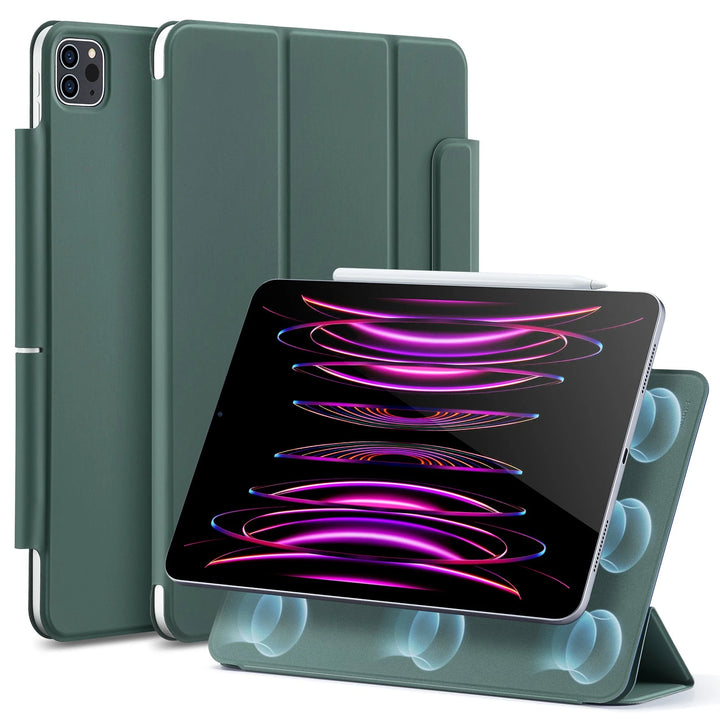
The Flip is the most versatile everyday case for iPad Air users. Its built-in Pencil holder keeps the stylus secure and charging at all times, and the folding cover locks into three landscape angles plus a portrait mode — stable enough for tapping without wobbling. The case is notably slim and light for its protection level, making it easy to carry in a bag without bulk.Best for: Students, commuters, and professionals who move between locations and want one case that handles everything.
Popular products
Popular ESR iPad Air Cases


Swipe horizontally to view more products.
ESR Shift Keyboard Case — Best for productivity and drawing
The Shift features a magnetic detachable design and a multi-angle stand, offering five distinct modes — detachable keyboard, standalone back case, adjustable landscape, low-angle landscape, and fixed portrait — supporting typing, browsing, viewing, sketching, and more. The elastic Pencil holder keeps the stylus secured alongside the keyboard, ready whenever you need to take notes or add annotations.Best for: Students and professionals who regularly switch between typed work and handwritten notes or sketches in the same session
[Explore iPad Air keyboard cases →]
Popular products
Popular ESR iPad Air Keyboard Cases & Bundles


Swipe horizontally to view more products.
Best iPad Pro Cases with Pencil Holder (11-inch & 13-inch, M5)
The current M5 iPad Pro (released October 2025) delivers a major leap in AI and graphics performance over the M4, and the cases that match it need to support demanding creative workflows — multi-angle stability for illustration, portrait mode for reference materials, and reliable Pencil storage through long sessions. Cases designed for the M4 are also compatible with the M5, as Apple kept the same chassis dimensions.
ESR Flip Magnetic Case (Pencil Holder) — Best slim protective case
The Flip’s magnetic stand system holds four positions: three landscape angles and one portrait mode. The same magnetic system attaches directly to metal surfaces — refrigerators, metal shelving, office whiteboards — making it genuinely useful in a wider range of environments than standard cases. The built-in Pencil holder keeps Apple Pencil Pro charged and accessible throughout.Best for: iPad Pro users who want a slim daily case that doesn’t sacrifice stand stability or Pencil storage.
Popular products
Popular ESR iPad Pro Cases


Swipe horizontally to view more products.
ESR Shift Keyboard Case — Best for professional creative workflows
The Shift supports Raised Screen View, which places the iPad adjacent to the user’s natural eyeline — the first iPad case to offer this mode. A dedicated Writing Mode provides three stable angles between 15° and 25° for note-taking and drawing, while Viewing Mode offers six stable angles between 30° and 70° for video. The recessed side channel and elasticated Pencil holder let Apple Pencil users magnetically pair and charge their stylus while keeping it safely stored during transit.Best for: Designers, illustrators, and heavy iPad Pro users who move through multiple modes in a single working session.
[Explore iPad Pro keyboard cases →]
Popular products
Popular ESR iPad Pro Keyboard Cases & Bundles


Swipe horizontally to view more products.
Best iPad 10th and 11th Generation Cases with Pencil Holder
The standard iPad is the entry point for many Apple Pencil users — particularly students and first-time iPad buyers. The current 11th generation (2025, A16 chip) runs at 10.9 inches, with the 10th generation sharing similar dimensions. Note: the iPad 12th generation is expected later in 2026 with an A18 chip and Apple Intelligence; ESR will update its case lineup within weeks of that launch. If you’re buying now for a student or adult user, 11th gen cases are the right pick.Considering buying later? If the iPad 12 keeps the same 10.9-inch chassis, cases designed for the 11th gen may carry over — check compatibility at [/collections/ipad-cases] once the 12th gen is announced.ESR Flip Magnetic Case (Pencil Holder) — Best all-round caseThe same Flip design available for iPad Air and Pro is also produced for the standard iPad line. For 10th and 11th generation users, it brings landscape and portrait stand angles with built-in Pencil storage — a meaningful upgrade over basic folio cases that offer no stand at all.Best for: Students and everyday users who want reliable protection and a stable stand without keyboard bulk.
[See iPad 10th gen cases →] | [Shop iPad 11th gen cases →]
ESR Flex Keyboard Case — Best budget keyboard option
The ESR Flex Keyboard Case lets you detach the iPad and use the keyboard separately via Bluetooth. It works in two landscape angles and includes a secure stylus holder. For students who want typing capability alongside stylus storage without the Shift’s price point, the Flex is a practical choice.Best for: Students on a budget who need both keyboard typing and stylus accessibility in one case.
If the iPad Is for a Young Child
The cases above are designed for students and adult users. If you’re buying an iPad 10th or 11th gen for a child aged 4 to 7, the priorities are different: a case that survives the daily drops that happen at that age, materials the child will be in contact with for hours at a time, and a way for small hands to carry it without needing an adult to help.The ESR Bounce Case for Kids is built specifically for that use case. It covers both the iPad 10th and 11th gen with military-grade drop protection, non-toxic BPA-free TPE, and an ergonomic handle sized for a young child’s grip. The 0°–170° stand covers drawing, watching, and video calls without repositioning. It also includes a built-in slot for the [ESR Geo Digital Pencil with Find My] — practical for a stylus that will eventually be left somewhere, since it appears in the same Find My app parents already use.For a detailed look at how it holds up in a family setting, see the [ESR Bounce Case for Kids full review →]. To browse the full kids case lineup by model, visit the [ESR protective kids iPad cases collection →].
Best iPad mini Cases with Pencil Holder (iPad mini 7 — mini 8 coming late 2026)
The iPad mini 7 (2024) offers the most portable Apple Pencil experience currently available. At 8.3 inches, it fits in a jacket pocket, making compact Pencil storage even more important — there’s no table to rest the stylus on when you’re holding the device. The iPad mini 8 is expected in Q3/Q4 2026 with an OLED display and A19 Pro chip; if you’re planning a purchase and can wait 3–6 months, it may be worth holding off.
ESR AirStance Magnetic Case (Pencil Holder) — Best for portability
The mini-sized Flip brings the same magnetic stand system in a form factor designed for one-handed carry. The built-in Pencil holder prevents the Apple Pencil Pro from detaching during transit, and the portrait stand mode makes the mini comfortable for longer reading or note-taking sessions without hand fatigue.Best for: Users who carry their iPad mini throughout the day and need reliable Pencil retention in a compact design.[See iPad mini cases →]
Which iPad Case with Pencil Holder Is Right for You?
| Your situation | Recommended case type |
|---|---|
| Student: notes, reading, occasional sketching | Flip Magnetic Case — lightweight, stable stand, Pencil always ready |
| Mobile professional: between meetings, multiple rooms | Flip Magnetic Case — compact, multi-angle, magnetic mounting |
| Creative/illustrator: long drawing sessions | Shift Keyboard Case — dedicated drawing angle, Raised Screen View |
| Productivity: keyboard input + Pencil annotations | Shift Keyboard Case — five modes, detachable keyboard, Pencil holder |
| Budget-conscious student | Flex Keyboard Case — Bluetooth keyboard + stylus holder at lower price |
| iPad mini user | AirStance Magnetic Case (mini) — secure Pencil retention, portrait stand |
| Parent buying for child aged 4–7 | ESR Bounce Case for Kids — ergonomic handle, BPA-free TPE, 170° stand, built-in stylus slot |
Still deciding? Browse the full range with model filtering at:→ [Shop all iPad cases with Apple Pencil holder]
How We Test and Pick Our Top iPad Cases
Every product recommended in this guide is tested across real use scenarios rather than specification sheets alone. Our evaluation covers:
- Protection — drop testing across screen, corners, and back. We look for raised bezels that protect the screen when placed face-down, and reinforced corners that absorb impact at the most vulnerable points.
- Stand stability — whether the case holds its angle when the screen is tapped during typing or drawing. A stand that shifts on each touch is unusable for note-taking.
- Pencil compatibility — whether the holder design allows wireless charging to continue, whether the Pencil is accessible without awkward steps, and whether the holder works with multiple Pencil generations.
- Daily carry test — carrying the case in a bag, pocket, or backpack for a week, checking whether the Pencil stays retained during normal movement.
- Weight and profile — measured against the base iPad weight to confirm the case doesn’t compromise the device’s core portable quality.We also reference third-party reviews and awards. The Red Dot Design Award, earned by ESR’s Flip Magnetic Case and Shift Keyboard Case in 2026, represents independent validation by an international
jury of design experts — a meaningful signal in a category where marketing claims are common.
FAQs About iPad Cases with Apple Pencil Holder
Does an iPad case with a Pencil holder still allow wireless charging?
It depends on the design. ESR cases are designed with a recessed magnetic cradle that leaves the iPad’s charging strip exposed, so the Apple Pencil Pro continues to charge passively while seated in the holder. Always verify this feature before purchasing — some cheaper cases use elastic loops that block the charging contact.
Will the Pencil holder work with Apple Pencil Pro, USB-C, and 2nd generation Pencil?
The holder style determines compatibility. Magnetic cradles work with any Pencil that attaches magnetically (Pencil Pro and 2nd gen). Apple Pencil (USB-C) charges differently and is physically compatible with the holder rails, but won’t charge wirelessly in the slot. Check the product compatibility notes for your specific Pencil model.
Does using a case with a Pencil holder affect overall thickness significantly?
Well-designed cases like the Flip Magnetic Case add minimal thickness compared to a basic folio case. The Pencil holder is incorporated into the existing case body rather than added as an external attachment. The total profile is thicker than bare, but comparable to any standard folio case.
Are these cases suitable for children or younger students?
The Flip Magnetic Case suits older students — secondary school age and above — who handle their iPad with reasonable care. For younger children aged 4 to 7, the requirements are different enough that a purpose-built case makes more sense. The ESR Bounce Case for Kids covers the iPad 10th and 11th gen with military-grade drop protection, BPA-free TPE materials, and an ergonomic carry handle sized for small hands. It pairs with the ESR Geo Digital Pencil with built-in Find My, stored in a dedicated slot on the case back. See the [ESR Bounce Case for Kids full review →] for a detailed breakdown, or go directly to the [kids iPad case collection →].
Can the Pencil holder cause scratches on the Pencil body?
ESR’s magnetic cradle designs use a smooth recessed channel rather than a tight elastic band. The Pencil rests against the case material without abrasion during normal use. Repeated insertion and removal with a tight elastic holder on other brands can cause finish wear over time.
Will these cases work after Apple releases a new iPad model?
Cases are model-specific. When Apple releases a new iPad generation, ESR typically updates its lineup within weeks of the hardware announcement. This guide is updated to reflect new models and chip generations at each annual revision. Bookmark this page and check back after any Apple iPad announcement.
Do these cases support landscape and portrait stand modes?
Yes. Both the Flip Magnetic Case and Shift Keyboard Case include portrait stand mode, which is useful for reading, FaceTime calls, and vertical scrolling. The number and range of landscape angles vary by model — the Shift offers the most options, including the 20-degree drawing angle.
What’s the difference between the Flip and the Shift?
The Flip is a folio-style case — magnetic cover, multiple stand angles, built-in Pencil holder, no keyboard. The Shift includes a detachable magnetic keyboard with a trackpad and supports five distinct use modes. If you need keyboard input regularly, the Shift makes sense. If you want a lighter everyday case without a keyboard, the Flip is the better fit.


