Just launched: Summer prints for your phone and wallet. Shop now
Save up to 70% on selected tech essentials Shop now
Free shipping on all orders over €50
Chariot 0
  • Coques
    • iPhone
    • iPad
    • Airpods
    • Samsung
      iPhone 17🔥
    • iPhone 17e🔥
    • iPhone 17 Pro Max🔥
    • iPhone 17 Pro🔥
    • iPhone Air🔥
    • iPhone 17🔥
    • iPhone 16
    • iPhone 16e
    • iPhone 16 Pro Max
    • iPhone 16 Pro
    • iPhone 16 Plus
    • iPhone 16
    • iPhone 15
    • iPhone 15 Pro Max
    • iPhone 15 Pro
    • iPhone 15 Plus
    • iPhone 15
    • iPhone 14
    • iPhone 14 Pro Max
    • iPhone 14 Pro
    • iPhone 14 Plus
    • iPhone 14
    • iPhone 13
    • iPhone 13 Pro Max
    • iPhone 13 Pro
    • iPhone 13
       
    • iPad Air 13 (2026)🔥
    • iPad Air 11 (2026)🔥
    •  
    • iPad Pro 13 (2025)
    • iPad Pro 11 (2025)
    • iPad 11th Gen (2025)
    • iPad Air 13 (2025)
    • iPad Air 11 (2025)
    •  
    • iPad Pro 13 (2024)
    • iPad Pro 11 (2024)
    • iPad Air 13 (2024)
    • iPad Air 11 (2024)
    • iPad mini 7 (2024)
    •  
    • iPad Pro 12.9 (2022)
    • iPad Pro 11 (2022)
    • iPad Air 5/4 (2022)
    • iPad 10th Gen (2022)
    •  
    • iPad mini 6 (2021)
    • iPad Pro 12.9 (2021)
    • iPad Pro 11 (2021)
    • iPad Pro 11 (2020)
       
    • AirPods Pro 3🔥
    • AirPods 4
    • AirPods Pro (2023/2022/2019)
      Galaxy S26🔥
    • Galaxy S26 Ultra🔥
    • Galaxy S26 Plus🔥
    • Galaxy S26🔥
    • Galaxy S25
    • Galaxy S25 Ultra
    • Galaxy S25+
    • Galaxy S24
    • Galaxy S24 Ultra
    • Galaxy S24+
    • Galaxy S24
    • Galaxy S23
    • Galaxy S23 Ultra
    • Galaxy S23
  • Protecteurs d’écran
    • iPhone
    • iPad
    • Apple Watch
    • Samsung
      iPhone 17🔥
    • iPhone 17e🔥
    • iPhone 17 Pro Max🔥
    • iPhone 17 Pro🔥
    • iPhone Air🔥
    • iPhone 17🔥
    • iPhone 16
    • iPhone 16e
    • iPhone 16 Pro Max
    • iPhone 16 Pro
    • iPhone 16 Plus
    • iPhone 16
    • iPhone 15
    • iPhone 15 Pro Max
    • iPhone 15 Pro
    • iPhone 15 Plus
    • iPhone 15
    • iPhone 14
    • iPhone 14 Pro Max
    • iPhone 14 Pro
    • iPhone 14 Plus
    • iPhone 14
    • iPhone 13
    • iPhone 13 Pro Max
    • iPhone 13/13 Pro
      Choose Your Device
    • iPad Air 13 (2026)🔥
    • iPad Air 11 (2026)🔥
    •  
    • iPad Pro 13 (2025)
    • iPad Pro 11 (2025)
    • iPad 11th Gen (2025)
    • iPad Air 13 (2025)
    • iPad Air 11 (2025)
    •  
    • iPad Pro 13 (2024)
    • iPad Pro 11 (2024)
    • iPad Air 13 (2024)
    • iPad Air 11 (2024)
    •  
    • iPad Pro 12.9 (6th/5th/4th/3rd Gen)
    • iPad Pro 11 (4th/3rd/2nd/1st Gen)
    • iPad Air 5/4 (2022)
    • iPad 10th Gen (2022)
    •  
       
    • Apple Watch🔥
      Galaxy S26🔥
    • Galaxy S26 Ultra🔥
    • Galaxy S25
    • Galaxy S25 Ultra
    • Galaxy S24
    • Galaxy S24 Ultra
    • Galaxy S23
    • Galaxy S23 Ultra
    • Galaxy S23+
    • Galaxy S23
    • Galaxy S22
    • Galaxy S22 Ultra
  • Claviers iPad & stylets
    • Claviers pour iPad
    • Stylets et Souris
      Choisissez votre appareil
    • iPad Air 13 (2026)🔥
    • iPad Air 11 (2026)🔥
    •  
    • iPad Pro 13 (2025)
    • iPad Pro 11 (2025)
    • iPad 11e génération (2025)
    • iPad Air 13 (2025)
    • iPad Air 11 (2025)
    •  
    • iPad Pro 13 (2024)
    • iPad Pro 11 (2024)
    • iPad Air 13 (2024)
    • iPad Air 11 (2024)
    •  
    • iPad Pro 12.9 (6e/5e/4e/3e génération)
    • iPad Pro 11 (4e/3e/2e/1er)
    • iPad Air 5/4 (2022)
    • iPad 10e génération (2022)
       
    • Stylets
    • Souris
  • Chargeurs
    • Chargeurs sans fil & supports
    • Chargeurs voiture et Supports
    Chargeurs sans fil & supports
    • Station de charge magnétique pliable 3-en-1 CryoBoost (25 W) – EU Plug-Black

      Station de charge magnétique pliable 3-en-1 CryoBoost (25 W) – EU Plug-Black

    • Set de recharge sans fil pour Watch Qi2 3 en 1 (HaloLock) - Grey - US PLUG

      Set de recharge sans fil pour Watch Qi2 3 en 1 (HaloLock) - Grey - US PLUG

    • Station de charge magnétique pliable 3-en-1 CryoBoost (25 W) – US Plug-Black

      Station de charge magnétique pliable 3-en-1 CryoBoost (25 W) – US Plug-Black

    • 25W CryoBoost Foldable 3-in-1 Magnetic Charger and Car Charger (Air Vent)  Bundle– EU Plug-Black

      25W CryoBoost Foldable 3-in-1 Magnetic Charger and Car Charger (Air Vent) Bundle– EU Plug-Black

    • Station de charge avec CryoBoost 3-en-1 (25 W, Qi2.2)  - EU Plug–Black

      Station de charge avec CryoBoost 3-en-1 (25 W, Qi2.2) - EU Plug–Black

    • All Chargeurs sans fil & supports >
    Chargeurs voiture et Supports
    • Chargeur de voiture sans fil Qi2 avec CryoBoost (HaloLock)  - Black

      Chargeur de voiture sans fil Qi2 avec CryoBoost (HaloLock) - Black

    • Chargeur de Voiture MagSafe avec CryoBoost™ (HaloLock) - Wireless Charger with 36W Adapter

      Chargeur de Voiture MagSafe avec CryoBoost™ (HaloLock) - Wireless Charger with 36W Adapter

    • Chargeur de voiture sans fil pour tableau de bord Qi2 (HaloLock) - Black

      Chargeur de voiture sans fil pour tableau de bord Qi2 (HaloLock) - Black

    • Chargeur de voiture magnétique sans fil Qi2 (HaloLock) - Black

      Chargeur de voiture magnétique sans fil Qi2 (HaloLock) - Black

    • Support Chargeur Sans Fil Magnétique HaloLock™ à Voiture - Black

      Support Chargeur Sans Fil Magnétique HaloLock™ à Voiture - Black

    • All Chargeurs voiture et Supports >
  • Porte-cartes
  • 🔥Nouveautés🔥
    • 🏝️Collection imprimée d’été🏝️
    • Série Galaxy S26
    • iPhone 17e🔥
    • Série iPad Air 2026
  • Promotions
    • ✏️Saison de la rentrée
    • Vente finale
  • Support
    • Contactez-nous
    • Vidéos de configuration et FAQs
    • FAQ générales
    • Statut de la commande
    • Politique de retour et de remboursement
    • Politique de garantie
    • Politique d'expédition
  • Explorer
    • Notre Histoire
    • ESR Blog
    • Salle de presse
Avantages Super User
  • Devenez un Super Utilisateur ESR
  • Offres exclusives Super Utilisateur
  • Parrainez des amis et recevez du Cashback
Mon compte
Se connecter Registre
North America
Europe
Asia Pacific
Middle East
United States
🌐 International
Allemagne
EUR €
Autriche
EUR €
Belgique
EUR €
Bulgarie
EUR €
Croatie
EUR €
Danemark
EUR €
Espagne
EUR €
Estonie
EUR €
Finlande
EUR €
France
EUR €
Grèce
EUR €
Hongrie
EUR €
Irlande
EUR €
Italie
EUR €
Lettonie
EUR €
Lituanie
EUR €
Luxembourg
EUR €
Norvège
EUR €
Pays-Bas
EUR €
Pologne
EUR €
Portugal
EUR €
Roumanie
EUR €
Slovaquie
EUR €
Slovénie
EUR €
Suède
EUR €
Suisse
EUR €
Tchéquie
EUR €
English
français
Deutsch
  • Coques
    • iPhone
    • iPad
    • Airpods
    • Samsung
      iPhone 17🔥
    • iPhone 17e🔥
    • iPhone 17 Pro Max🔥
    • iPhone 17 Pro🔥
    • iPhone Air🔥
    • iPhone 17🔥
    • iPhone 16
    • iPhone 16e
    • iPhone 16 Pro Max
    • iPhone 16 Pro
    • iPhone 16 Plus
    • iPhone 16
    • iPhone 15
    • iPhone 15 Pro Max
    • iPhone 15 Pro
    • iPhone 15 Plus
    • iPhone 15
    • iPhone 14
    • iPhone 14 Pro Max
    • iPhone 14 Pro
    • iPhone 14 Plus
    • iPhone 14
    • iPhone 13
    • iPhone 13 Pro Max
    • iPhone 13 Pro
    • iPhone 13
       
    • iPad Air 13 (2026)🔥
    • iPad Air 11 (2026)🔥
    •  
    • iPad Pro 13 (2025)
    • iPad Pro 11 (2025)
    • iPad 11th Gen (2025)
    • iPad Air 13 (2025)
    • iPad Air 11 (2025)
    •  
    • iPad Pro 13 (2024)
    • iPad Pro 11 (2024)
    • iPad Air 13 (2024)
    • iPad Air 11 (2024)
    • iPad mini 7 (2024)
    •  
    • iPad Pro 12.9 (2022)
    • iPad Pro 11 (2022)
    • iPad Air 5/4 (2022)
    • iPad 10th Gen (2022)
    •  
    • iPad mini 6 (2021)
    • iPad Pro 12.9 (2021)
    • iPad Pro 11 (2021)
    • iPad Pro 11 (2020)
       
    • AirPods Pro 3🔥
    • AirPods 4
    • AirPods Pro (2023/2022/2019)
      Galaxy S26🔥
    • Galaxy S26 Ultra🔥
    • Galaxy S26 Plus🔥
    • Galaxy S26🔥
    • Galaxy S25
    • Galaxy S25 Ultra
    • Galaxy S25+
    • Galaxy S24
    • Galaxy S24 Ultra
    • Galaxy S24+
    • Galaxy S24
    • Galaxy S23
    • Galaxy S23 Ultra
    • Galaxy S23
  • Protecteurs d’écran
    • iPhone
    • iPad
    • Apple Watch
    • Samsung
      iPhone 17🔥
    • iPhone 17e🔥
    • iPhone 17 Pro Max🔥
    • iPhone 17 Pro🔥
    • iPhone Air🔥
    • iPhone 17🔥
    • iPhone 16
    • iPhone 16e
    • iPhone 16 Pro Max
    • iPhone 16 Pro
    • iPhone 16 Plus
    • iPhone 16
    • iPhone 15
    • iPhone 15 Pro Max
    • iPhone 15 Pro
    • iPhone 15 Plus
    • iPhone 15
    • iPhone 14
    • iPhone 14 Pro Max
    • iPhone 14 Pro
    • iPhone 14 Plus
    • iPhone 14
    • iPhone 13
    • iPhone 13 Pro Max
    • iPhone 13/13 Pro
      Choose Your Device
    • iPad Air 13 (2026)🔥
    • iPad Air 11 (2026)🔥
    •  
    • iPad Pro 13 (2025)
    • iPad Pro 11 (2025)
    • iPad 11th Gen (2025)
    • iPad Air 13 (2025)
    • iPad Air 11 (2025)
    •  
    • iPad Pro 13 (2024)
    • iPad Pro 11 (2024)
    • iPad Air 13 (2024)
    • iPad Air 11 (2024)
    •  
    • iPad Pro 12.9 (6th/5th/4th/3rd Gen)
    • iPad Pro 11 (4th/3rd/2nd/1st Gen)
    • iPad Air 5/4 (2022)
    • iPad 10th Gen (2022)
    •  
       
    • Apple Watch🔥
      Galaxy S26🔥
    • Galaxy S26 Ultra🔥
    • Galaxy S25
    • Galaxy S25 Ultra
    • Galaxy S24
    • Galaxy S24 Ultra
    • Galaxy S23
    • Galaxy S23 Ultra
    • Galaxy S23+
    • Galaxy S23
    • Galaxy S22
    • Galaxy S22 Ultra
  • Claviers iPad & stylets
    • Claviers pour iPad
    • Stylets et Souris
      Choisissez votre appareil
    • iPad Air 13 (2026)🔥
    • iPad Air 11 (2026)🔥
    •  
    • iPad Pro 13 (2025)
    • iPad Pro 11 (2025)
    • iPad 11e génération (2025)
    • iPad Air 13 (2025)
    • iPad Air 11 (2025)
    •  
    • iPad Pro 13 (2024)
    • iPad Pro 11 (2024)
    • iPad Air 13 (2024)
    • iPad Air 11 (2024)
    •  
    • iPad Pro 12.9 (6e/5e/4e/3e génération)
    • iPad Pro 11 (4e/3e/2e/1er)
    • iPad Air 5/4 (2022)
    • iPad 10e génération (2022)
       
    • Stylets
    • Souris
  • Chargeurs
    • Chargeurs sans fil & supports
    • Chargeurs voiture et Supports
    Chargeurs sans fil & supports
    • Station de charge magnétique pliable 3-en-1 CryoBoost (25 W) – EU Plug-Black

      Station de charge magnétique pliable 3-en-1 CryoBoost (25 W) – EU Plug-Black

    • Set de recharge sans fil pour Watch Qi2 3 en 1 (HaloLock) - Grey - US PLUG

      Set de recharge sans fil pour Watch Qi2 3 en 1 (HaloLock) - Grey - US PLUG

    • Station de charge magnétique pliable 3-en-1 CryoBoost (25 W) – US Plug-Black

      Station de charge magnétique pliable 3-en-1 CryoBoost (25 W) – US Plug-Black

    • 25W CryoBoost Foldable 3-in-1 Magnetic Charger and Car Charger (Air Vent)  Bundle– EU Plug-Black

      25W CryoBoost Foldable 3-in-1 Magnetic Charger and Car Charger (Air Vent) Bundle– EU Plug-Black

    • Station de charge avec CryoBoost 3-en-1 (25 W, Qi2.2)  - EU Plug–Black

      Station de charge avec CryoBoost 3-en-1 (25 W, Qi2.2) - EU Plug–Black

    • All Chargeurs sans fil & supports >
    Chargeurs voiture et Supports
    • Chargeur de voiture sans fil Qi2 avec CryoBoost (HaloLock)  - Black

      Chargeur de voiture sans fil Qi2 avec CryoBoost (HaloLock) - Black

    • Chargeur de Voiture MagSafe avec CryoBoost™ (HaloLock) - Wireless Charger with 36W Adapter

      Chargeur de Voiture MagSafe avec CryoBoost™ (HaloLock) - Wireless Charger with 36W Adapter

    • Chargeur de voiture sans fil pour tableau de bord Qi2 (HaloLock) - Black

      Chargeur de voiture sans fil pour tableau de bord Qi2 (HaloLock) - Black

    • Chargeur de voiture magnétique sans fil Qi2 (HaloLock) - Black

      Chargeur de voiture magnétique sans fil Qi2 (HaloLock) - Black

    • Support Chargeur Sans Fil Magnétique HaloLock™ à Voiture - Black

      Support Chargeur Sans Fil Magnétique HaloLock™ à Voiture - Black

    • All Chargeurs voiture et Supports >
  • Porte-cartes
  • 🔥Nouveautés🔥
    • 🏝️Collection imprimée d’été🏝️
    • Série Galaxy S26
    • iPhone 17e🔥
    • Série iPad Air 2026
  • Promotions
    • ✏️Saison de la rentrée
    • Vente finale
  • Support
    • Contactez-nous
    • Vidéos de configuration et FAQs
    • FAQ générales
    • Statut de la commande
    • Politique de retour et de remboursement
    • Politique de garantie
    • Politique d'expédition
  • Explorer
    • Notre Histoire
    • ESR Blog
    • Salle de presse
Avantages Super User
  • Devenez un Super Utilisateur ESR
  • Offres exclusives Super Utilisateur
  • Parrainez des amis et recevez du Cashback

Devenez Super User et profitez de récompenses exclusives

  • * 15 % de remise de bienvenue
  • * Gagnez des points à chaque achat
  • * Avantages exclusifs réservés aux membres
Rejoindre maintenant Se connecter
Chariot 0
North America
Europe
Asia Pacific
Middle East
United States
🌐 International
Allemagne
EUR €
Autriche
EUR €
Belgique
EUR €
Bulgarie
EUR €
Croatie
EUR €
Danemark
EUR €
Espagne
EUR €
Estonie
EUR €
Finlande
EUR €
France
EUR €
Grèce
EUR €
Hongrie
EUR €
Irlande
EUR €
Italie
EUR €
Lettonie
EUR €
Lituanie
EUR €
Luxembourg
EUR €
Norvège
EUR €
Pays-Bas
EUR €
Pologne
EUR €
Portugal
EUR €
Roumanie
EUR €
Slovaquie
EUR €
Slovénie
EUR €
Suède
EUR €
Suisse
EUR €
Tchéquie
EUR €
English
français
Deutsch

Rechercher notre magasin

Devenez Super User et profitez de récompenses exclusives

  • * 15 % de remise de bienvenue
  • * Gagnez des points à chaque achat
  • * Avantages exclusifs réservés aux membres
Rejoindre maintenant Se connecter
Chariot 0
Recherches populaires:
iPad 2026 Case iPhone 17e Galaxy S26 iPad Keyboard
Comment Faire

How to Fix iPhone Storage Full? (10 ways)

par Adam sur Jul 27, 2020
How to Fix iPhone Storage Full

If you are about to take a beautiful picture and suddenly a dreadful message of storage full appears on your iPhone screen – we are sure you will feel frustrated whenever you have to delete your previous picture to free up some space on your iPhone.

Don’t worry! You can now free up some space on your iPhone without deleting your beautiful memories. Here we have figured out some ways to manage your iPhone storage full issues. If you follow these ways correctly, you can enjoy sufficient storage without any concerns about running out of iPhone’s space.

  1. Keep your photos in iCloud Photo Library

Videos and pictures take a lot of storage space. You can use the iCloud Photo Library that lets you store all your pictures by freeing up some storage space.

Using the iCloud Photo Library for optimizing the storage features of the iPhone enables you to make some space by uploading the older photos on the iCloud account. This will not consume your storage space, and you can re-download the photos whenever you want. Follow out following steps:

  • Tap on “Settings”.Choose “Photos and Camera”.
  • Turn on “iCloud Photo Library”.
  • Make sure to select the option of “Optimize Phone Storage” on your iPhone.

Keep your photos in iCloud Photo Library

Note:  Keep in mind that iCloud may take some time to finish uploading your photos and to re-index your photos app.

  1.  Delete Unused and Pre-installed apps

We all download different apps on our devices for a single-use and then forget to remove those unused apps. Furthermore, there are some apps that have already been installed by Apple like Stocks, Remote, and Compass. Apple is now giving its users the option to delete pre-installed apps if they want to do so. It’s a great way to make enough space on your phone. To delete an app, follow these steps:

  • Press on the app’s icon on the home screen until it starts jiggling.
  • Tap “×” on the left side of the icon to delete an app.

Delete Unused and Pre-installed apps

  1.  Figure out which app is taking a lot of space

Some apps gobble up a lot of memory on the iPhone. Many people usually don’t have any idea about how much space a particular app is taking. To find out the amount of space taken by different apps:

  • Go to “Settings”. Tap “General” and then “Storage and iCloud Usage”.
  • Tap “Manage Storage”.This will give you an overview of different apps taking how much space in your phone.

Figure out which app is taking a lot of space

If an unused app is utilizing much space, delete it since you don’t need it. If a specific small app is taking up much space, you can free up some space by deleting the data linked with that app.

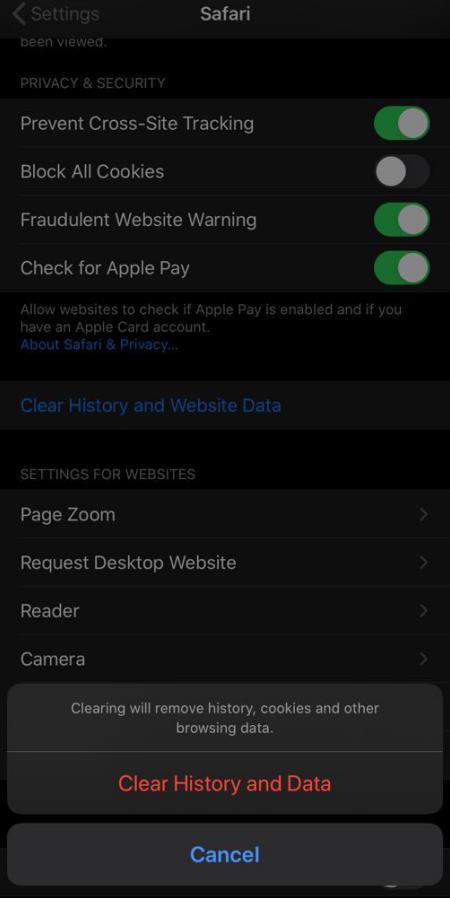
  1. Clear out your browsing data

Browsing history and some other files are saved by internet browsers such as Chrome, Internet Explorer and Safari, etc. to make internet experience seamless. If you use a browser frequently, then these extra files will definitely take up considerable storage. In order to clean up the browser caches to get enough storage on your iPhone, follow these steps:

  • Go to “Settings”.Tap on the browser, which you use most frequently.
  • Tap “Clear History and Website Data”.

Clear out your browsing data

Note: Clearing browsing caches will close all your tabs, so make sure to bookmark any needed websites before cleaning up.

  1. Use pCloud to listen to your favorite music

You want to keep your favorite tracks on your phone but you are upset because you don’t have enough space for it. Right? Why not upload all your favorite music and listen to it when you want by using the pCloud app?

Use pCloud to listen to your favorite music

If you are a true music lover with an extensive collection of tracks, this app can be a perfect storage saver for you. You will get a 10 GB of free space when you sign up for the first time in pCloud.

  1. Delete offline data from your iPhone

iPhone saves website data and browser (like safari) reading list for convenient viewing when you are not connected to the internet. It definitely takes up some storage on your device. If you want to clear your reading list, follow these steps:

  • Go to “Settings” and then “General”.
  • Tap on “Manage storage” and then the name of your browser like “Safari”.
  • Tap on “Offline Reading List”, and then press“Delete”.
  1. Delete your old messages

Text conversations may take much storage on your phone, especially if you are receiving a lot of pictures. To free up enough space on your iPhone, go to your old conversations and delete as many of them as you want. You can also command your iOS to purge messages after a particular duration. For this follow these steps:

  • Go to “Settings” then “Messages”.
  • Tap on “Messages History” and then tap “Keep Messages”.
  • Select a certain length of time. Older messages will be purged automatically.

Delete your old messages

  1. Use Standard Definition Picture Resolution

Remember not to keep all your photos in High Definition Resolution (HDR). These photos take up an ample space making your iPhone storage full within no time. Standard Definition is usually sufficient unless you really need a high picture resolution photo. To make sure you are not consuming much space while clicking HDR photos every time, follow these steps:

  • Go to “Settings” then “Photos and Camera”.
  • Set the  “Format” option that takes up less space, i.e. “Most Compatible”.

 Use Standard Definition Picture Resolution

  1. Backup you files to Cloud

iCloud-based storage is specifically designed for iPhone for optimizing your storage space. You can backup your large files here. You can enjoy 5GB of storage after setting up iCloud. After backing up your important documents, pictures and videos, you can now delete them from your iPhone as they will still remain in iCloud. This will create sufficient storage for the proper functioning of your device.

Backup you files to Cloud

  1. Remove your iPhone Backup

In the case of full storage in iCloud, you will get full storage notification on your phone even if you have deleted some large files to make some space on your iPhone. To solve this issue, follow these steps:

  • Go to “Settings”.Tap your iCloud ID at the top of the screen.
  • Tap “iCloud” and then “Manage Storage”.
  • Tap “Backups” and then “Delete Backups”.

Remove your iPhone Backup

Conclusion

Running out of space is really very annoying in critical situations. You can solve your full storage issues by implementing these ways and keep using your iPhone without any troubles.

  • iphone 14
Précédent
How to Speed up Your Macbook Pro? (Make Your Mac Run Faster)
Suivant
How to Sync your iPhone to Macbook?

Articles Liés

phone protection for college students with big deal

Comment protéger votre téléphone à l'université : ce que chaque étudiant de première année doit savoir

Why You Need a Phone Stand

Phone Stand Types Compared: Built-In Case Stand, Ring Stand, or Desk Stand — Which Is Right for You?

AirPods Pro 3 and 2 Protection Guide 2026

Guide de protection des AirPods Pro 3 et 2 (2026) : Empêchez vos écouteurs de tomber grâce à des habitudes quotidiennes plus intelligentes

esr find-my magsafe wallet:never worry about the lost your wallet

Comment retrouver votre portefeuille perdu : des solutions classiques à la solution moderne

Laissez un commentaire

Votre adresse email ne sera pas publiée.

Recent Post

How to Fix Tech Neck: A Student’s Guide to a Better Dorm Desk Setup
L'essentiel pour un bureau d'étudiant : étudier plus confortablement sans se fatiguer la nuque
par Carolin
Best Kids iPad Cases 2026: Drop Tested, Safety Checked & Full Buyer’s Guide
Les meilleures coques iPad pour enfants en 2026 : le guide d'achat complet
par Javeria Salam
Do You Need a Phone Case? Pros, Cons, and How to Choose the Right One
Which iPhone Case Should You Actually Buy?
par Jessica
From Desks to iPads: 15+ Best Work-From-Home Essentials for a Professional Remote Setup
par Javeria Salam
Why Your "Tough" Case Might Be Failing You (And the Physics of Real Protection)
Pourquoi votre coque « robuste » pourrait vous décevoir (et la physique de la vraie protection)
par Carolin

Company

  • À propos de nous
  • Notre blog
  • Rédaction
  • Devenir revendeur

Products

  • Conçu pour MagSafe
  • Étuis de protection pour téléphones
  • Étuis pour iPad
  • Protecteurs d'écran
  • Chargement sans fil
  • Productivité
  • Portefeuilles magnétiques
  • Autres accessoires

Community

  • Mon compte
  • Programme d'affiliation

Support

  • Contactez-nous
  • Vidéos d'installation et FAQ
  • Statut de la commande
  • Retour et remboursement
  • Politique de garantie
  • Politique d'expédition
  • Modes de paiement

Options de paiement:
  • American Express
  • JCB
  • Mastercard
  • PayPal
  • Visa
  • Klarna Klarna
  • Afterpay

© 2026 ESR All rights reserved.

  • Conditions d'utilisation
  • politique de confidentialité
  • Déclaration légale
  • Politique relative aux cookies
  • Politique d'expédition
  • Retour et remboursement
  • Ne vendez pas et ne partagez pas mes informations personnelles
  • Recherche

Panier

Get a 15% off coupon when you

sign up

for free shipping!

€38,00
You're €38,00 away from Free Shipping!

€50,00
You're €50,00 away from Free Shipping!

Your Cart is Empty

Sign In / Register to view saved cart items
Shop Now
ESR_IMG

ESR_IMG

ESR_IMG

ESR_IMG

Total €0,00
Voir le panier

Thank you for choosing to transfer to a human service.

Sorry! The previous responses were from our AI customer service. Since it didn't satisfy you, you've been transferred to a human agent. We'll reply within 24 hours from Mon to Fri and 48 hours on weekends for further help.

Please select the reason for transfer