
Just launched: Summer prints for your phone and wallet. Shop now
Save up to 70% on selected tech essentials Shop now
Free shipping on all orders over €50
Chariot 0
  • Coques
    • iPhone
    • iPad
    • Airpods
    • Samsung
      iPhone 17🔥
    • iPhone 17e🔥
    • iPhone 17 Pro Max🔥
    • iPhone 17 Pro🔥
    • iPhone Air🔥
    • iPhone 17🔥
    • iPhone 16
    • iPhone 16e
    • iPhone 16 Pro Max
    • iPhone 16 Pro
    • iPhone 16 Plus
    • iPhone 16
    • iPhone 15
    • iPhone 15 Pro Max
    • iPhone 15 Pro
    • iPhone 15 Plus
    • iPhone 15
    • iPhone 14
    • iPhone 14 Pro Max
    • iPhone 14 Pro
    • iPhone 14 Plus
    • iPhone 14
    • iPhone 13
    • iPhone 13 Pro Max
    • iPhone 13 Pro
    • iPhone 13
       
    • iPad Air 13 (2026)🔥
    • iPad Air 11 (2026)🔥
    •  
    • iPad Pro 13 (2025)
    • iPad Pro 11 (2025)
    • iPad 11th Gen (2025)
    • iPad Air 13 (2025)
    • iPad Air 11 (2025)
    •  
    • iPad Pro 13 (2024)
    • iPad Pro 11 (2024)
    • iPad Air 13 (2024)
    • iPad Air 11 (2024)
    • iPad mini 7 (2024)
    •  
    • iPad Pro 12.9 (2022)
    • iPad Pro 11 (2022)
    • iPad Air 5/4 (2022)
    • iPad 10th Gen (2022)
    •  
    • iPad mini 6 (2021)
    • iPad Pro 12.9 (2021)
    • iPad Pro 11 (2021)
    • iPad Pro 11 (2020)
       
    • AirPods Pro 3🔥
    • AirPods 4
    • AirPods Pro (2023/2022/2019)
      Galaxy S26🔥
    • Galaxy S26 Ultra🔥
    • Galaxy S26 Plus🔥
    • Galaxy S26🔥
    • Galaxy S25
    • Galaxy S25 Ultra
    • Galaxy S25+
    • Galaxy S24
    • Galaxy S24 Ultra
    • Galaxy S24+
    • Galaxy S24
    • Galaxy S23
    • Galaxy S23 Ultra
    • Galaxy S23
  • Protecteurs d’écran
    • iPhone
    • iPad
    • Apple Watch
    • Samsung
      iPhone 17🔥
    • iPhone 17e🔥
    • iPhone 17 Pro Max🔥
    • iPhone 17 Pro🔥
    • iPhone Air🔥
    • iPhone 17🔥
    • iPhone 16
    • iPhone 16e
    • iPhone 16 Pro Max
    • iPhone 16 Pro
    • iPhone 16 Plus
    • iPhone 16
    • iPhone 15
    • iPhone 15 Pro Max
    • iPhone 15 Pro
    • iPhone 15 Plus
    • iPhone 15
    • iPhone 14
    • iPhone 14 Pro Max
    • iPhone 14 Pro
    • iPhone 14 Plus
    • iPhone 14
    • iPhone 13
    • iPhone 13 Pro Max
    • iPhone 13/13 Pro
      Choose Your Device
    • iPad Air 13 (2026)🔥
    • iPad Air 11 (2026)🔥
    •  
    • iPad Pro 13 (2025)
    • iPad Pro 11 (2025)
    • iPad 11th Gen (2025)
    • iPad Air 13 (2025)
    • iPad Air 11 (2025)
    •  
    • iPad Pro 13 (2024)
    • iPad Pro 11 (2024)
    • iPad Air 13 (2024)
    • iPad Air 11 (2024)
    •  
    • iPad Pro 12.9 (6th/5th/4th/3rd Gen)
    • iPad Pro 11 (4th/3rd/2nd/1st Gen)
    • iPad Air 5/4 (2022)
    • iPad 10th Gen (2022)
    •  
       
    • Apple Watch🔥
      Galaxy S26🔥
    • Galaxy S26 Ultra🔥
    • Galaxy S25
    • Galaxy S25 Ultra
    • Galaxy S24
    • Galaxy S24 Ultra
    • Galaxy S23
    • Galaxy S23 Ultra
    • Galaxy S23+
    • Galaxy S23
    • Galaxy S22
    • Galaxy S22 Ultra
  • Claviers iPad & stylets
    • Claviers pour iPad
    • Stylets et Souris
      Choisissez votre appareil
    • iPad Air 13 (2026)🔥
    • iPad Air 11 (2026)🔥
    •  
    • iPad Pro 13 (2025)
    • iPad Pro 11 (2025)
    • iPad 11e génération (2025)
    • iPad Air 13 (2025)
    • iPad Air 11 (2025)
    •  
    • iPad Pro 13 (2024)
    • iPad Pro 11 (2024)
    • iPad Air 13 (2024)
    • iPad Air 11 (2024)
    •  
    • iPad Pro 12.9 (6e/5e/4e/3e génération)
    • iPad Pro 11 (4e/3e/2e/1er)
    • iPad Air 5/4 (2022)
    • iPad 10e génération (2022)
       
    • Stylets
    • Souris
  • Chargeurs
    • Chargeurs sans fil & supports
    • Chargeurs voiture et Supports
    Chargeurs sans fil & supports
    • Station de charge magnétique pliable 3-en-1 CryoBoost (25 W) – EU Plug-Black

      Station de charge magnétique pliable 3-en-1 CryoBoost (25 W) – EU Plug-Black

    • Set de recharge sans fil pour Watch Qi2 3 en 1 (HaloLock) - Grey - US PLUG

      Set de recharge sans fil pour Watch Qi2 3 en 1 (HaloLock) - Grey - US PLUG

    • Station de charge magnétique pliable 3-en-1 CryoBoost (25 W) – US Plug-Black

      Station de charge magnétique pliable 3-en-1 CryoBoost (25 W) – US Plug-Black

    • 25W CryoBoost Foldable 3-in-1 Magnetic Charger and Car Charger (Air Vent)  Bundle– EU Plug-Black

      25W CryoBoost Foldable 3-in-1 Magnetic Charger and Car Charger (Air Vent) Bundle– EU Plug-Black

    • Station de charge avec CryoBoost 3-en-1 (25 W, Qi2.2)  - EU Plug–Black

      Station de charge avec CryoBoost 3-en-1 (25 W, Qi2.2) - EU Plug–Black

    • All Chargeurs sans fil & supports >
    Chargeurs voiture et Supports
    • Chargeur de voiture sans fil Qi2 avec CryoBoost (HaloLock)  - Black

      Chargeur de voiture sans fil Qi2 avec CryoBoost (HaloLock) - Black

    • Chargeur de Voiture MagSafe avec CryoBoost™ (HaloLock) - Wireless Charger with 36W Adapter

      Chargeur de Voiture MagSafe avec CryoBoost™ (HaloLock) - Wireless Charger with 36W Adapter

    • Chargeur de voiture sans fil pour tableau de bord Qi2 (HaloLock) - Black

      Chargeur de voiture sans fil pour tableau de bord Qi2 (HaloLock) - Black

    • Chargeur de voiture magnétique sans fil Qi2 (HaloLock) - Black

      Chargeur de voiture magnétique sans fil Qi2 (HaloLock) - Black

    • Support Chargeur Sans Fil Magnétique HaloLock™ à Voiture - Black

      Support Chargeur Sans Fil Magnétique HaloLock™ à Voiture - Black

    • All Chargeurs voiture et Supports >
  • Porte-cartes
  • 🔥Nouveautés🔥
    • 🏝️Collection imprimée d’été🏝️
    • Série Galaxy S26
    • iPhone 17e🔥
    • Série iPad Air 2026
  • Promotions
    • ✏️Saison de la rentrée
    • Vente finale
  • Support
    • Contactez-nous
    • Vidéos de configuration et FAQs
    • FAQ générales
    • Statut de la commande
    • Politique de retour et de remboursement
    • Politique de garantie
    • Politique d'expédition
  • Explorer
    • Notre Histoire
    • ESR Blog
    • Salle de presse
Avantages Super User
  • Devenez un Super Utilisateur ESR
  • Offres exclusives Super Utilisateur
  • Parrainez des amis et recevez du Cashback
Mon compte
Se connecter Registre
North America
Europe
Asia Pacific
Middle East
United States
🌐 International
Allemagne
EUR €
Autriche
EUR €
Belgique
EUR €
Bulgarie
EUR €
Croatie
EUR €
Danemark
EUR €
Espagne
EUR €
Estonie
EUR €
Finlande
EUR €
France
EUR €
Grèce
EUR €
Hongrie
EUR €
Irlande
EUR €
Italie
EUR €
Lettonie
EUR €
Lituanie
EUR €
Luxembourg
EUR €
Norvège
EUR €
Pays-Bas
EUR €
Pologne
EUR €
Portugal
EUR €
Roumanie
EUR €
Slovaquie
EUR €
Slovénie
EUR €
Suède
EUR €
Suisse
EUR €
Tchéquie
EUR €
English
français
Deutsch
  • Coques
    • iPhone
    • iPad
    • Airpods
    • Samsung
      iPhone 17🔥
    • iPhone 17e🔥
    • iPhone 17 Pro Max🔥
    • iPhone 17 Pro🔥
    • iPhone Air🔥
    • iPhone 17🔥
    • iPhone 16
    • iPhone 16e
    • iPhone 16 Pro Max
    • iPhone 16 Pro
    • iPhone 16 Plus
    • iPhone 16
    • iPhone 15
    • iPhone 15 Pro Max
    • iPhone 15 Pro
    • iPhone 15 Plus
    • iPhone 15
    • iPhone 14
    • iPhone 14 Pro Max
    • iPhone 14 Pro
    • iPhone 14 Plus
    • iPhone 14
    • iPhone 13
    • iPhone 13 Pro Max
    • iPhone 13 Pro
    • iPhone 13
       
    • iPad Air 13 (2026)🔥
    • iPad Air 11 (2026)🔥
    •  
    • iPad Pro 13 (2025)
    • iPad Pro 11 (2025)
    • iPad 11th Gen (2025)
    • iPad Air 13 (2025)
    • iPad Air 11 (2025)
    •  
    • iPad Pro 13 (2024)
    • iPad Pro 11 (2024)
    • iPad Air 13 (2024)
    • iPad Air 11 (2024)
    • iPad mini 7 (2024)
    •  
    • iPad Pro 12.9 (2022)
    • iPad Pro 11 (2022)
    • iPad Air 5/4 (2022)
    • iPad 10th Gen (2022)
    •  
    • iPad mini 6 (2021)
    • iPad Pro 12.9 (2021)
    • iPad Pro 11 (2021)
    • iPad Pro 11 (2020)
       
    • AirPods Pro 3🔥
    • AirPods 4
    • AirPods Pro (2023/2022/2019)
      Galaxy S26🔥
    • Galaxy S26 Ultra🔥
    • Galaxy S26 Plus🔥
    • Galaxy S26🔥
    • Galaxy S25
    • Galaxy S25 Ultra
    • Galaxy S25+
    • Galaxy S24
    • Galaxy S24 Ultra
    • Galaxy S24+
    • Galaxy S24
    • Galaxy S23
    • Galaxy S23 Ultra
    • Galaxy S23
  • Protecteurs d’écran
    • iPhone
    • iPad
    • Apple Watch
    • Samsung
      iPhone 17🔥
    • iPhone 17e🔥
    • iPhone 17 Pro Max🔥
    • iPhone 17 Pro🔥
    • iPhone Air🔥
    • iPhone 17🔥
    • iPhone 16
    • iPhone 16e
    • iPhone 16 Pro Max
    • iPhone 16 Pro
    • iPhone 16 Plus
    • iPhone 16
    • iPhone 15
    • iPhone 15 Pro Max
    • iPhone 15 Pro
    • iPhone 15 Plus
    • iPhone 15
    • iPhone 14
    • iPhone 14 Pro Max
    • iPhone 14 Pro
    • iPhone 14 Plus
    • iPhone 14
    • iPhone 13
    • iPhone 13 Pro Max
    • iPhone 13/13 Pro
      Choose Your Device
    • iPad Air 13 (2026)🔥
    • iPad Air 11 (2026)🔥
    •  
    • iPad Pro 13 (2025)
    • iPad Pro 11 (2025)
    • iPad 11th Gen (2025)
    • iPad Air 13 (2025)
    • iPad Air 11 (2025)
    •  
    • iPad Pro 13 (2024)
    • iPad Pro 11 (2024)
    • iPad Air 13 (2024)
    • iPad Air 11 (2024)
    •  
    • iPad Pro 12.9 (6th/5th/4th/3rd Gen)
    • iPad Pro 11 (4th/3rd/2nd/1st Gen)
    • iPad Air 5/4 (2022)
    • iPad 10th Gen (2022)
    •  
       
    • Apple Watch🔥
      Galaxy S26🔥
    • Galaxy S26 Ultra🔥
    • Galaxy S25
    • Galaxy S25 Ultra
    • Galaxy S24
    • Galaxy S24 Ultra
    • Galaxy S23
    • Galaxy S23 Ultra
    • Galaxy S23+
    • Galaxy S23
    • Galaxy S22
    • Galaxy S22 Ultra
  • Claviers iPad & stylets
    • Claviers pour iPad
    • Stylets et Souris
      Choisissez votre appareil
    • iPad Air 13 (2026)🔥
    • iPad Air 11 (2026)🔥
    •  
    • iPad Pro 13 (2025)
    • iPad Pro 11 (2025)
    • iPad 11e génération (2025)
    • iPad Air 13 (2025)
    • iPad Air 11 (2025)
    •  
    • iPad Pro 13 (2024)
    • iPad Pro 11 (2024)
    • iPad Air 13 (2024)
    • iPad Air 11 (2024)
    •  
    • iPad Pro 12.9 (6e/5e/4e/3e génération)
    • iPad Pro 11 (4e/3e/2e/1er)
    • iPad Air 5/4 (2022)
    • iPad 10e génération (2022)
       
    • Stylets
    • Souris
  • Chargeurs
    • Chargeurs sans fil & supports
    • Chargeurs voiture et Supports
    Chargeurs sans fil & supports
    • Station de charge magnétique pliable 3-en-1 CryoBoost (25 W) – EU Plug-Black

      Station de charge magnétique pliable 3-en-1 CryoBoost (25 W) – EU Plug-Black

    • Set de recharge sans fil pour Watch Qi2 3 en 1 (HaloLock) - Grey - US PLUG

      Set de recharge sans fil pour Watch Qi2 3 en 1 (HaloLock) - Grey - US PLUG

    • Station de charge magnétique pliable 3-en-1 CryoBoost (25 W) – US Plug-Black

      Station de charge magnétique pliable 3-en-1 CryoBoost (25 W) – US Plug-Black

    • 25W CryoBoost Foldable 3-in-1 Magnetic Charger and Car Charger (Air Vent)  Bundle– EU Plug-Black

      25W CryoBoost Foldable 3-in-1 Magnetic Charger and Car Charger (Air Vent) Bundle– EU Plug-Black

    • Station de charge avec CryoBoost 3-en-1 (25 W, Qi2.2)  - EU Plug–Black

      Station de charge avec CryoBoost 3-en-1 (25 W, Qi2.2) - EU Plug–Black

    • All Chargeurs sans fil & supports >
    Chargeurs voiture et Supports
    • Chargeur de voiture sans fil Qi2 avec CryoBoost (HaloLock)  - Black

      Chargeur de voiture sans fil Qi2 avec CryoBoost (HaloLock) - Black

    • Chargeur de Voiture MagSafe avec CryoBoost™ (HaloLock) - Wireless Charger with 36W Adapter

      Chargeur de Voiture MagSafe avec CryoBoost™ (HaloLock) - Wireless Charger with 36W Adapter

    • Chargeur de voiture sans fil pour tableau de bord Qi2 (HaloLock) - Black

      Chargeur de voiture sans fil pour tableau de bord Qi2 (HaloLock) - Black

    • Chargeur de voiture magnétique sans fil Qi2 (HaloLock) - Black

      Chargeur de voiture magnétique sans fil Qi2 (HaloLock) - Black

    • Support Chargeur Sans Fil Magnétique HaloLock™ à Voiture - Black

      Support Chargeur Sans Fil Magnétique HaloLock™ à Voiture - Black

    • All Chargeurs voiture et Supports >
  • Porte-cartes
  • 🔥Nouveautés🔥
    • 🏝️Collection imprimée d’été🏝️
    • Série Galaxy S26
    • iPhone 17e🔥
    • Série iPad Air 2026
  • Promotions
    • ✏️Saison de la rentrée
    • Vente finale
  • Support
    • Contactez-nous
    • Vidéos de configuration et FAQs
    • FAQ générales
    • Statut de la commande
    • Politique de retour et de remboursement
    • Politique de garantie
    • Politique d'expédition
  • Explorer
    • Notre Histoire
    • ESR Blog
    • Salle de presse
Avantages Super User
  • Devenez un Super Utilisateur ESR
  • Offres exclusives Super Utilisateur
  • Parrainez des amis et recevez du Cashback

Devenez Super User et profitez de récompenses exclusives

  • * 15 % de remise de bienvenue
  • * Gagnez des points à chaque achat
  • * Avantages exclusifs réservés aux membres
Rejoindre maintenant Se connecter
Chariot 0
North America
Europe
Asia Pacific
Middle East
United States
🌐 International
Allemagne
EUR €
Autriche
EUR €
Belgique
EUR €
Bulgarie
EUR €
Croatie
EUR €
Danemark
EUR €
Espagne
EUR €
Estonie
EUR €
Finlande
EUR €
France
EUR €
Grèce
EUR €
Hongrie
EUR €
Irlande
EUR €
Italie
EUR €
Lettonie
EUR €
Lituanie
EUR €
Luxembourg
EUR €
Norvège
EUR €
Pays-Bas
EUR €
Pologne
EUR €
Portugal
EUR €
Roumanie
EUR €
Slovaquie
EUR €
Slovénie
EUR €
Suède
EUR €
Suisse
EUR €
Tchéquie
EUR €
English
français
Deutsch

Rechercher notre magasin

Devenez Super User et profitez de récompenses exclusives

  • * 15 % de remise de bienvenue
  • * Gagnez des points à chaque achat
  • * Avantages exclusifs réservés aux membres
Rejoindre maintenant Se connecter
Chariot 0
Recherches populaires:
iPad 2026 Case iPhone 17e Galaxy S26 iPad Keyboard
Comment Faire

iPhone Cannot Charge Wirelessly? 10 Easy Fixes You Can Try First

par Deb Hazarika sur Oct 19, 2023
iPhone wireless charger not working

When an iPhone suddenly stops charging on a wireless pad, it's hard to know where to start. Is it the charger, or something wrong with the iPhone itself? On Reddit, some users report that their iPhones cannot charge wirelessly after iOS updates, and the battery drains completely.
Next, let’s look at why wireless charging may suddenly stop working, especially after iOS updates. This guide also provides practical fixes you can try right away.

learning how to fix iPhone wireless charging issues

Quick Answers to Common User Questions

iOS Versions and Wireless Charging Behavior

Common Wireless Charging Issues

Chargers Worth Considering

How iOS Limits Fast Wireless Charging

Quick Answers to Common User Questions

What color should the charging light be, yellow or blue?

On many chargers, a blue or green light indicates the device is charging normally and is properly aligned. A yellow or orange light typically signals slower charging, less power being delivered, the device being misaligned, or that the charger is limiting power to prevent overheating.

iphone charging wirelessly on charging padiOS Versions and Wireless Charging Behavior

Different iOS versions can change how fast wireless charging works and how your iPhone detects MagSafe chargers. Some users notice wireless charging feels less stable right after major iOS updates during overnight charging sessions.

Why Does it Happen?

● iOS manages battery health differently across versions, sometimes slowing wireless charging to reduce long‑term battery wear.

● If your iPhone or the charger gets too hot, iOS will pause or stop wireless charging. This prevents damage from overheating and is a standard safety feature.

● As Apple updates iOS, the way your iPhone detects Qi- and MagSafe-compatible chargers can change, affecting how quickly charging begins.

● Features like Low Power Mode or Optimized Battery Charging may pause wireless charging at specific battery levels to protect battery health. how different ios versions affect wireless charging performance

Real User Pain Points

Many people only notice these changes when wireless charging suddenly fails right after installing a new iOS update.

1. Overnight Drop: The phone starts charging normally but stops charging at some point during the night, leaving the battery low by morning.

2. Intermittent Charging: One YouTube creator reported the pad worked reliably before an update, then experienced random disconnects immediately afterward.

3. Slow Start and Interruptions:Some forum users report that wireless charging worked before an update, but slowed down and cut out frequently with the same charger afterward.

4. Car Wireless Pad Failure: iPhone charges fine by cable, yet the wireless pad in the car fails after a recent iOS upgrade. real user pain points iphone wireless charging

Deep Dive: Settings to Check

Go to Settings → Battery → Battery Health & Charging and check Optimized Battery Charging. Turn it off to see whether scheduled charging behavior is slowing wireless charging.

Practical Recommendation

Keeping your iPhone updated is important, as Apple regularly fixes charging bugs in newer iOS versions. If problems appear after an update, treat them as temporary bugs and watch for patch releases. After major updates, test with at least one Qi charger you know works.

Common Wireless Charging Issues

People find that when the charger light turns on, the iPhone battery won’t charge wirelessly as expected. The problems discussed below will help you see where wireless charging usually fails on iPhones.

1. Does Not Support Wireless Charging: Only iPhone 8 and later models support Qi wireless charging. Always confirm your exact model in Settings and check it against the wireless charging compatibility list.

2. Incompatible Charger: Some older pads are not Qi‑certified. Many reputable accessory makers advise choosing Qi‑certified chargers paired with a reliable USB‑C power adapter for consistent performance.

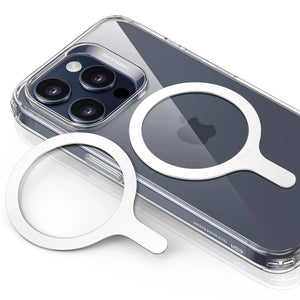
3. Accessories Blocking Charging: Thick cases, metal plates for car mounts, or non‑MagSafe magnetic rings can block the wireless charging field. Users on forums say they often fix “no charging” simply by removing the case, then switching to a wireless‑friendly case later.

4. Glitches After iOS Update: Users report that their phones begin charging but then fail to continue charging. Apple suggests resetting its settings before assuming there is hardware damage.

5. Power Delivery Limits: Fast wireless charging pushes more power and generates heat, triggering built-in thermal protection that temporarily slows charging. issues with iphone wireless charging

How iOS Limits Fast Wireless Charging

When your charger works but charging slows down, there are usually two reasons: your phone is getting warm, or your battery is almost full. iOS slows wireless charging to prevent overheating and to protect the battery when it gets over 80% charged. If you notice slower charging under these conditions, it’s the phone keeping itself safe, not a malfunction.

10 Ways to Quickly Fix Wireless Charging

When wireless charging fails, you should start with simple checks before assuming the charger is broken. A clear iPhone charging troubleshooting process helps you find the issue.

Check If The Charger Is Powered

Make sure the wall adapter is connected and powered on. Check the cable and ensure it clicks into place on the charger and adapter. If the indicator light never appears, try a different adapter and cable set before assuming anything is wrong with your phone.

Get iPhone Sitting In The Right Spot

Place your iPhone in the center of the pad and slide it until the charging icon appears. With MagSafe, you should feel a clear magnetic “snap.” If the magnetic snap feels weaker than usual, something may be interfering with it. That may be a thick case or a non-MagSafe wallet attached to the back. If charging keeps dropping, try rotating the phone and testing a stand-style charger for better alignment.

Update iOS to Clear Wireless Charging Bugs

In iPhone Settings, go to General → Software Update. Install any pending iOS version offered by Apple. Users report that wireless charging resumes after updating. After updating, restart your iPhone and test the same wireless charger again. 

update ios version to fix iphone charging bug

4. Remove Things That Block Charging

Many people forget there is metal hidden in their favorite case, stand, or magnetic car mount. Take the phone out of its case, remove any ring and wallet, and then place it on the pad. If it starts charging bare but fails again, you need a thinner case.

remove iphone wireless charging blockade materials

5. Test Another Charger and Pad Style

Flat Qi pads and MagSafe stands position the charging coil differently relative to your iPhone. If one consistently drops the connection, switching pad styles is worth testing before buying a new charger entirely. If one setup always works and another keeps dropping, keep the reliable one for nightly use and reserve the other for short wireless charging sessions.

6. Check Charger Power and Compatibility

Many “not charging” complaints come from chargers that cannot deliver enough power. Look for at least a 7.5W Qi rating and a solid USB‑C power adapter to avoid basic Qi wireless charger issues. Check your charger certification, since underpowered accessories often cause slow or failed wireless charging.

7. Restart iPhone

A phone restart can clear small glitches that prevent your iPhone from communicating with the wireless charger. Turn the iPhone off and restart it to test charging again.

8. Clean The Charging Area

Dust residue on the back glass surface weakens the charging connection. Wipe both surfaces gently with a soft cloth and try placing the phone again in the center. People who carry phones without cases often see better results after cleaning away fine dust.

cleaning iphone back to avoid charging interruptions

9. Check for Overheating and Physical Misalignment (Especially in Cars)

Wireless charging is notoriously sensitive to temperature and positioning, which is exactly why car pads fail so frequently. If your iPhone is sitting on the dashboard in direct sunlight while GPS is running, it’s going to overheat. When that happens, iOS will trigger a thermal limit and stop charging immediately to protect the battery.

Beyond heat, physical movement is a major culprit; even a slight shift during a turn can knock the phone out of the "sweet spot" on a flat charging pad. If your charging is inconsistent on the road, switching to a magnetic MagSafe mount is often the best solution to keep the coils locked in place, even through road vibrations.

10. Get Help From Apple

If you have tried different chargers and wireless charging still fails, it may be a hardware issue. A hidden internal fault cannot be fixed at home. At that point, booking an appointment with Apple Support is the safest way to fix the problem.

 get iphone accessory replaced by apple

Tip: If your wired charging port is broken, rely on MagSafe or Qi‑certified wireless power banks as your most dependable backup for everyday charging.

Chargers Worth Considering

On a desk, a Qi2.2 25W charging station can hold your iPhone upright so you can easily see notifications while charging. That kind of stand also reduces random dropouts compared with flat pads scattered around the workspace.

cryoboost esr 25w charging stand 3 in 1


In the car, a Qi2 25W MagSafe car charger with CryoBoost can keep your navigation phone topped up during long drives. Stronger magnets and higher power help offset heat and movement that can cause weaker chargers to stop charging.

esr magsafe best car wireless charger 25w

If you want a single solution for travel, a Qi‑certified multi-device charger, such as ESR’s foldable 3‑in‑1 station, lets you power your iPhone, AirPods, and Apple Watch from a single compact setup.

People Also Ask

Does Low Power Mode affect wireless charging speed?

Not necessarily. Low Power Mode actually scales back background tasks, which can often help your phone charge faster because it’s consuming less power overall. However, if you’re trying to figure out why a charger is acting up, it’s a good idea to turn it off. This gives you a clean look at how the hardware is performing without any software-side adjustments getting in the way.

Why does my iPhone get warm on a wireless pad?

Some warmth is normal because wireless charging generates heat as a byproduct of energy transfer. If your iPhone feels hot, iOS will slow down charging to protect the battery. Remove any thick case, place the phone on a hard, flat surface, and avoid heavy gaming while charging. If it still overheats, poor alignment or a hot environment is more likely the cause.

Do I need an official MagSafe charger for stable wireless charging?

No. You do not strictly need an official MagSafe charger for stable wireless charging. MagSafe is built on the Qi standard, and many high-quality Qi-certified chargers provide reliable alignment and consistent charging performance while helping reduce charging interruptions.

Final Verdict

If your iPhone cannot charge wirelessly, start with simple checks, such as checking for updates and removing the case. Use quality wireless chargers from trusted brands, and keep your phone and charger surfaces clean. Even with a damaged wired port, MagSafe- and Qi‑certified power banks still provide reliable charging.

Mots clés: iPhone, iPhone 14, iPhone 14 Plus, iphone 14 pro, iphone 14 pro max, iphone 15, iphone 15 plus, iphone 15 pro, iphone 15 pro max
Précédent
Comment recharger une Apple Watch sans chargeur ?
Suivant
10 Fixes to Solve iPhone 15 Not Charging in 2024

Articles Liés

phone protection for college students with big deal

Comment protéger votre téléphone à l'université : ce que chaque étudiant de première année doit savoir

Why You Need a Phone Stand

Phone Stand Types Compared: Built-In Case Stand, Ring Stand, or Desk Stand — Which Is Right for You?

AirPods Pro 3 and 2 Protection Guide 2026

Guide de protection des AirPods Pro 3 et 2 (2026) : Empêchez vos écouteurs de tomber grâce à des habitudes quotidiennes plus intelligentes

esr find-my magsafe wallet:never worry about the lost your wallet

Comment retrouver votre portefeuille perdu : des solutions classiques à la solution moderne

Laissez un commentaire

Votre adresse email ne sera pas publiée.

Recent Post

How to Fix Tech Neck: A Student’s Guide to a Better Dorm Desk Setup
L'essentiel pour un bureau d'étudiant : étudier plus confortablement sans se fatiguer la nuque
par Carolin
Best Kids iPad Cases 2026: Drop Tested, Safety Checked & Full Buyer’s Guide
Les meilleures coques iPad pour enfants en 2026 : le guide d'achat complet
par Javeria Salam
Do You Need a Phone Case? Pros, Cons, and How to Choose the Right One
Which iPhone Case Should You Actually Buy?
par Jessica
From Desks to iPads: 15+ Best Work-From-Home Essentials for a Professional Remote Setup
par Javeria Salam
Why Your "Tough" Case Might Be Failing You (And the Physics of Real Protection)
Pourquoi votre coque « robuste » pourrait vous décevoir (et la physique de la vraie protection)
par Carolin

Company

  • À propos de nous
  • Notre blog
  • Rédaction
  • Devenir revendeur

Products

  • Conçu pour MagSafe
  • Étuis de protection pour téléphones
  • Étuis pour iPad
  • Protecteurs d'écran
  • Chargement sans fil
  • Productivité
  • Portefeuilles magnétiques
  • Autres accessoires

Community

  • Mon compte
  • Programme d'affiliation

Support

  • Contactez-nous
  • Vidéos d'installation et FAQ
  • Statut de la commande
  • Retour et remboursement
  • Politique de garantie
  • Politique d'expédition
  • Modes de paiement

Options de paiement:
  • American Express
  • JCB
  • Mastercard
  • PayPal
  • Visa
  • Klarna Klarna
  • Afterpay

© 2026 ESR All rights reserved.

  • Conditions d'utilisation
  • politique de confidentialité
  • Déclaration légale
  • Politique relative aux cookies
  • Politique d'expédition
  • Retour et remboursement
  • Ne vendez pas et ne partagez pas mes informations personnelles
  • Recherche

Panier

Get a 15% off coupon when you

sign up

for free shipping!

€38,00
You're €38,00 away from Free Shipping!

€50,00
You're €50,00 away from Free Shipping!

Your Cart is Empty

Sign In / Register to view saved cart items
Shop Now
ESR_IMG

ESR_IMG

ESR_IMG

ESR_IMG

Total €0,00
Voir le panier

Thank you for choosing to transfer to a human service.

Sorry! The previous responses were from our AI customer service. Since it didn't satisfy you, you've been transferred to a human agent. We'll reply within 24 hours from Mon to Fri and 48 hours on weekends for further help.

Please select the reason for transfer