









iPhone users have been debating unlock methods for years. Many users like Face ID because it feels modern and hands-free. However, it often struggles in low light and fails when the phone lies flat on a desk. On Reddit, users often say side-mounted fingerprint sensors feel faster and more reliable in daily use.
With iPhone Fold rumors and delayed under-display Face ID, Apple users are asking one question: why can’t iPhone offer both unlock options? In this guide, we clearly compare each technology to help iPhone users understand which unlock method works best in real life.

Face ID Deep Dive: Apple’s Gold Standard (But Not Perfect)
Under-Display Fingerprint: Android's Bet (iPhone's Future?)
Side-Mounted Fingerprint: Speed King for Everyday Use
Comparison: Face ID vs. Under-Display vs. Side-Mounted Fingerprint
The Hidden Connection: How Your Unlock Method Defines Your Charging Setup
The Best iPhone Accessories for 2026
Face ID Deep Dive: Apple’s Gold Standard (But Not Perfect)
Face ID is Apple’s primary biometric unlock system. Apple introduced Face ID to replace Touch ID on most iPhones. However, real-world use shows both strengths and limits around Face ID battery drain during frequent unlocks. Understanding how Face ID works explains why Apple still relies on it.
● Face ID uses the TrueDepth camera system on the front of the iPhone.
● The dot projector sends over 30,000 infrared dots onto your face.
● The infrared camera reads the dot pattern to identify facial features.
● Apple keeps the notch or Dynamic Island because this hardware needs space.
● The system creates a secure 3D depth map of your face.

Pros and Cons of Face ID
To understand Face ID further, let’s highlight some pros and cons of having a phone protected by Face ID.
Pros
● Face ID offers the highest biometric security on smartphones.
● Apple reports a false match rate of about 1 in 1,000,000.
Cons
● Masks and sunglasses still cause unlock issues for some users.
● Face ID increases battery drain because its sensors stay active during unlocks.
iPhone Roadmap
Current leaks suggest under-display Face ID may not arrive until the iPhone 18 Pro in 2026. Even then, a punch-hole camera may remain. For now, Face ID stays visible, power-hungry, and unavailable as a secondary unlock.
Under-Display Fingerprint: Android's Bet (iPhone's Future?)
Under-display fingerprint sensors sit beneath OLED screens, a design popular on Samsung and other Android phones. Apple may adopt this technology in the future to bring under-display fingerprint iPhone options. This technology is already common on Samsung and other Android phones.
● Optical sensors use light to capture fingerprint images through the screen.
● Sound waves are used in ultrasonic sensors for 3D fingerprint scanning.
● The sensor sits under the OLED display to keep the screen fully visible.
● iPhone may use ultrasonic technology for higher security and speed.

Pros and Cons of Under-Display Fingerprint
Now, look at the key advantages and disadvantages of under-display fingerprint sensors.
Pros
● Full-screen design hides the sensor to keep the display fully visible.
● Unlock speed is fast and can reach about 0.2 seconds on premium devices.
Cons
● Screen protectors can reduce the sensor’s unlocking accuracy.
● Optical sensors are less secure than ultrasonic fingerprint sensors.
Data & Accuracy
Here is a quick comparison of accuracy between optical and ultrasonic sensors.
|
Sensor Type |
Accuracy |
|
Optical |
95% |
|
Ultrasonic |
99% |
iPhone Rumors: Touch ID Return and Health Sensors
Ultrasonic vs optical fingerprint technology is also being speculated to be the favored technology used in future iPhones. Current Touch ID rumors suggest a return on iPhone 19, possibly combined with health sensors like pulse and oxygen monitoring.
Side-Mounted Fingerprint: Speed King for Everyday Use
A side-mounted fingerprint sensor is built into a power button, a design used on Sony Xperia phones and older Pixel devices. Reddit polls show about 70% of users prefer side sensors over in-display fingerprint sensors.
How This Technology Works
The side-mounted fingerprint sensor works in a simple and direct way.
● The sensor sits inside the power button for fast unlocking.
● Reads fingerprints immediately when you pick up the phone.
● Works reliably with wet fingers or light gloves on hand.

Pros and Cons of Side-Mounted Fingerprint
Let’s explore the main advantages and disadvantages of this type of fingerprint sensor.
Pros
● Fastest unlock speed, taking only about 0.15 seconds daily.
● It allows easy one-hand use without awkward finger stretching.
Cons
● Slightly less secure than Apple’s 3D Face ID system.
● Requires precise phone case cutouts for easy finger access.
iPhone Rumors
According to iPhone Fold rumors, the device may feature a side-mounted fingerprint sensor in a hybrid setup alongside Face ID. This design could solve thickness issues while maintaining fast unlock performance.

Comparison: Face ID vs. Under-Display vs. Side-Mounted Fingerprint
This Touch ID vs Face ID 2026 comparison helps iPhone buyers see the differences clearly.
|
Feature |
Face ID |
Under-Display FP |
Side-Mounted FP |
|
Speed (Approx.) |
0.6s |
0.4s |
0.15s |
|
Security |
Highest |
Medium |
High |
|
Wet Finger Fail |
None |
High |
Low |
|
Battery Use |
High |
Low |
Lowest |
|
Future iPhone |
Under-display rumored 2026 |
Possible iPhone 19 |
Likely iPhone Fold |
|
Real-World Cases |
In bed, effortless unlock |
Lying flat on table, moderate speed |
Gym & rainy days, fastest reliable |
The Hidden Connection: How Your Unlock Method Defines Your Charging Setup
Your choice of biometric unlock method not only affects security and speed but also changes how convenient charging can be. Some chargers support certain unlock methods better, while others create daily frustration.
1. Face ID with Magnetic Stands
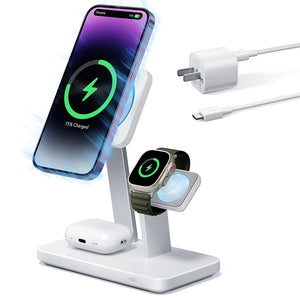
Face ID works best when the phone is angled toward your face. Magnetic stands, like the ESR Qi2 Wireless Charger, naturally hold the phone in this position.
● The phone is automatically aligned toward your face.
● With iOS Standby Mode, a simple glance lets you see notifications, widgets, or the clock.
● Tip: Choose a MagSafe-compatible charger with a 15°–60° tilt for the best experience.
Best For: Face ID users who check their phone frequently while charging.

2. Fingerprint Sensors with Flat Charging Pads
Fingerprint sensors are ideal for phones lying flat to solve issues where Face ID struggles.
● Under-Display: Press the screen to unlock without moving the phone.
● Side-Mounted: Grip the phone to unlock instantly, even on a flat surface.
● Fingerprint users don’t need to worry about viewing angles, making them perfect for flat pads or embedded desk chargers.
Best For: Users who unlock phones often while lying flat or at a desk.
3. Magnetic Strength and Stability
Under-display fingerprint sensors require some pressure to register a fingerprint. Weak magnets can cause the phone to wobble or slide during unlock.
● ESR’s strong magnets with a 2300g+ suction hold the phone securely.
● This ensures stability whether pressing the screen or swiping apps while charging.
Takeaway: A secure magnetic stand improves both charging safety and unlocking reliability.

The Best iPhone Accessories for 2026
Keeping your iPhone safe is important to make it last and stay in good condition. This is where ESR comes with a variety of iPhone cases and screen protectors that give strong protection and resist scratches. Their tempered glass keeps the screen clear and lets Face ID work without problems, while keeping your display safe from everyday wear.
For users who charge frequently, ESR’s wireless chargers provide stability and speed. Magnetic alignment and adjustable tilt angles make using your iPhone convenient while it charges. These accessories protect your device without interfering with core features. Now, let’s explore the top-notch products by ESR that work best with iPhone Face ID and rumored in-display fingerprint.
1. UltraFit Armorite Pro Screen Protector - 3 Pack
A high-quality screen protector lets you use Face ID and other features without interruption. ESR’s tempered glass shields your screen from scratches, drops, and daily wear, while keeping touch sensitivity reliable for everyday use.

|
Features |
Specs |
|
Protection |
Resists 64g steel ball from 8.4 ft (Tested) |
|
Colors Trueness |
7-layer Magnetron Sputtering |
|
Build |
Double-ion-exchanged glass by Corning |
|
Scratch Resistance |
25% reduction in scratches |
2. Qi2 25W 3-in-1 Watch Wireless Charging Set (HaloLock)
This wireless charging setup keeps your devices powered while allowing easy Face ID access. It holds your phone at the perfect angle, so unlocking is quick and convenient, while charging your accessories safely during everyday use.

|
Features |
Specs |
|
Charging Time |
0 to 50% in 30 min (Tested on iPhone 16 Pro) |
|
Apple Watch Charging |
Detachable dongle to change everywhere |
|
Charging Capacity |
25W for iPhone, 5W for Apple Watch |
People Also Ask
When is the best time to buy a new iPhone?
New iPhone prices can vary throughout the year, depending on releases and promotions. For guidance on timing your purchase, check out this detailed guide here .
Do under-display fingerprint sensors work with tempered glass screen protectors?
Some tempered glass protectors may reduce sensor accuracy. Choose high-quality, thin screen protectors designed for under-display fingerprint compatibility to ensure reliable unlocking.
How does a side-mounted fingerprint sensor affect my choice of phone case?
Side-mounted sensors require cases that leave the sensor accessible. As we approach the rumored iPhone Fold release, case design is being optimized to balance protection with easy biometric access.
Why should I consider my phone's unlock method when buying a wireless charger?
Face ID works best with angled magnetic stands, while fingerprint unlock works best with flat, stable charging pads. The right charger improves daily convenience and reduces unlock frustration.
Final Verdict
In this article, we explored the latest iPhone biometric unlock methods, including Face ID, under-display, and side-mounted fingerprint sensor technology. Each offers unique advantages for speed and security. If you want to keep your iPhone protected with Face ID fully functional, consider ESR’s accessories as your go-to gadgets. Moreover, iPhone 2026 accessories will come out shortly, so stay tuned for latest updates!


