







Since the release of the iPhone 17—and with early buzz around the upcoming iPhone 17e—battery performance has been a hot topic among users upgrading from older models. Even though Apple has technically boosted battery capacity, many users say they aren't seeing a noticeable improvement in everyday use. It’s no surprise that Reddit and Apple forums are flooded with questions like, “Why is my iPhone battery draining so fast?”
You’re probably familiar with the usual tips—like turning down your screen brightness or switching on Low Power Mode. While those can help a bit, they rarely get to the root of battery drain problems on the latest iPhones. In this guide, we’ll go beyond the basics to look at what’s really happening with battery capacity, iOS features, and how people actually use their phones day-to-day.

iPhone 12 to 17 Battery Capacity Comparison, What Changed, What Did Not
10 Real Fixes That Actually Reduce iPhone Battery Drain
Why Is My Battery Draining So Fast After the Latest iOS Update?
Do Android Phones Have Better Battery Life Than iPhones?
Recommended iPhone Accessories to Avoid Battery Drain
iPhone 12 to 17 Battery Capacity Comparison, What Changed, What Did Not
Apple rarely markets battery size, but overall battery capacity still plays a meaningful role in daily performance. Let’s take an overview based on widely reported figures and reliable teardown estimates from industry sources.
|
Model |
Reported Battery Capacity (mAh) |
Max Wired Charging Speed |
Max Wireless Charging Speed |
|
iPhone 12 |
2815 mAh |
Up to 20 W wired (USB-C to Lightning fast charge) |
Up to 15 W MagSafe; up to 7.5 W Qi |
|
iPhone 13 |
3227 mAh |
Up to 20 W wired (USB-C to Lightning fast charge) |
Up to 15 W MagSafe; up to 7.5 W Qi |
|
iPhone 14 |
3279 mAh |
Up to 20 W wired (USB-C to Lightning fast charge) |
Up to 15 W MagSafe; up to 7.5 W Qi |
|
iPhone 15 |
3349 mAh |
Up to 27 W wired (USB-C fast charge under optimal conditions) |
Up to 15 W MagSafe; up to 7.5 W Qi |
|
iPhone 16 |
3561 mAh |
Up to 27 W wired (USB-C fast charge under optimal conditions) |
Up to 15 W MagSafe; Qi2 supported up to 15 W |
|
iPhone 17 |
3692 mAh |
Up to 27 W wired (USB-C fast charge, Apple not officially capped) |
Up to 15 W MagSafe; Qi2 supported up to 15 W |
|
iPhone 17e |
Not announced, rumored only |
Not announced |
Not announced |
Key Insight
iPhones have seen battery capacity increase slowly, while power-hungry features have expanded at a much faster pace. High-refresh displays, brighter panels, AI processing, and heavier background syncing offset most gains. This helps explain why many users report fast-draining iPhone batteries on newer models.
10 Real Fixes That Actually Reduce iPhone Battery Drain
Having explored the battery evolution from iPhone 12 to iPhone 17, let’s look at the top-tested fixes to avoid iPhone battery drain.
1. Identify iOS Background Power Hogs
After major iOS updates, background tasks such as indexing, photo analysis, and AI operations significantly increase overall power usage on many devices. Users can check “Settings” → “Battery” → “Battery Usage by App” to identify applications consuming unusually high power without corresponding screen activity.

2. Rebuild Location Permissions
Location services rank among the most common causes of excessive battery drain reported on Reddit and Apple Discussions forums. Resetting app location permissions and assigning “While Using” instead of “Always” for weather or social apps reduces unnecessary energy consumption.

3. Disable Push for Non-Essential Apps
Push notifications from email, social media, and news applications often wake the device dozens of times per hour unnecessarily. Switching these apps to fetch data every 30 to 60 minutes improves standby battery life and prevents excessive energy drain during idle periods.

4. Reduce ProMotion Where Possible
iPhone 13 Pro through iPhone 17 Pro models include ProMotion displays that dynamically adjust refresh rates for smooth visuals. Some apps maintain unnecessarily high refresh rates, and limiting screen animations reduces GPU load and improves battery efficiency throughout daily use.

5. Check Battery Health Calibration
If your battery percentage drops suddenly or the phone shuts down unexpectedly, start with Battery Health and cycle count, then update iOS and restart the device. Modern iPhones do not require routine full discharge calibration, and deep discharges can add unnecessary wear. If the issue persists, Apple Support recommends checking the maximum capacity and peak performance and servicing the battery if needed. (Apple Support)

6. Heat Is the Silent Battery Killer
Excessive heat generated during MagSafe charging or gaming accelerates battery wear and reduces short-term energy efficiency. Use proper accessories and avoid running multiple heavy tasks at once to protect battery lifespan and maintain consistent power performance.

7. Review iCloud Sync Behavior
Battery usage often increases after updates or device restores due to iCloud syncing of Photos. Allowing these tasks to complete while connected to Wi-Fi and charging prevents unnecessary drain during daily usage.

8. Avoid Cheap Chargers and Cables
Low-quality or uncertified chargers can cause unstable power delivery and generate excess heat, which negatively affects long-term battery health. Qi2-certified and reliable MagSafe alternatives provide stable charging to extend battery lifespan.

9. Reset Network Settings
Weak cellular signals often force iPhones to repeatedly search for stronger connections, resulting in unnecessary battery drain throughout the day. Resetting network settings allows the device to rebuild optimal carrier connections, reducing energy usage caused by constant network scanning and poor reception.

10. Update But Not Too Fast
Beta versions of major iOS releases occasionally cause higher battery drain due to ongoing system optimization processes. Early iOS releases often cause temporary energy loss, so users should wait for the first stabilization updates to improve battery efficiency.

Why Is My Battery Draining So Fast After the Latest iOS Update?
After a major iOS update, it is normal to see higher battery use for a short period while the system finishes tasks like Spotlight indexing, photo analysis, and app optimization. Apple Support community replies commonly reference a 3 to 5 day window for this post update settling, especially right after a major release.
How iOS releases are staged:
1. Developer beta for early testing.
2. Public beta for broader testing.
3. Official release.
4. Point updates such as 26.0.1, 26.1, 26.2, which typically focus on fixes, performance, and feature refinements.(Apple Newsroom, iOS 26 Highlights Page)
Which Version Drains Battery the Fastest?
Which versions drain battery the most: early betas and the first public release can be less efficient, since apps and system services are still optimizing. Many users report improvements after one or two point updates. (Tom’s Guide)
Should You Upgrade Your iOS System?
If battery life is your top priority, consider waiting until the first point update of a major release before installing, unless you need a security fix. Apple has moved to year-based version naming, so iOS 26 is the current major release, and there is no iOS 25 in the public release line.(Apple Newsroom) For more tips on improving iPhone battery life, read the official guide here.

Do Android Phones Have Better Battery Life Than iPhones?
Android flagships include much larger batteries with 5000 mAh in some models. However, battery life depends on more than just capacity. The tight hardware and software integration of Apple allows smaller batteries to perform well in real-world usage.
That said, Android manufacturers tend to prioritize raw capacity, while Apple focuses on thermal control.
Recommended iPhone Accessories to Avoid Battery Drain
For accessories, many brands focus on appearance while paying less attention to heat management, which can contribute to the iPhone battery draining faster over time. This is where ESR differentiates itself by designing iPhone cases that balance protection with airflow and thermal considerations, helping reduce unnecessary heat buildup during daily use and charging. You can learn more about charging safety and case performance in this detailed guide here.
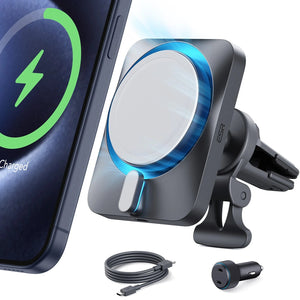
In addition to protective cases, using a compatible and well-designed charger plays an important role in supporting healthier charging behavior. ESR’s MagSafe chargers focus on stable magnetic alignment and consistent power delivery rather than maximum output alone. This helps reduce inefficient charging and excess heat, which can support long-term battery health, even though overall battery drain still depends largely on usage patterns and iOS background activity.
ESR’s Top iPhone Case and MagSafe Charger Options
Now, let’s explore popular ESR iPhone cases and MagSafe charger options designed to help reduce battery drainage.
1. Cyber Tough Case with Stash Stand (HaloLock)
This case combines advanced magnetic alignment with practical usability for everyday charging convenience. Its design improves MagSafe and wireless charging efficiency while providing a sturdy stand for easy hands‑free use.

Key Features
1. Magnetic alignment maintains a stronger connection and efficient MagSafe charging.
2. Integrated stash stand supports upright positioning for convenient access while charging wirelessly.
3. Low-interference design minimizes heat buildup during charging to maintain healthier battery performance.
2. CryoBoost 3-in-1 Magnetic Charging Station
This wireless charging station delivers fast charging for multiple devices simultaneously. Its design optimizes power distribution to ensure your iPhone, AirPods, and Apple Watch charge safely.

Key Features
1. Supports 3-device charging with optimized 25W total output for faster power delivery.
2. Qi2-certified technology delivers stable wireless charging while maintaining device battery health.
3. Compact design keeps devices aligned properly for maximum charging performance without frequent adjustments.
People Also Ask
Can I charge my iPhone 17 with an Android charger and cable?
Yes, you can use a compatible Android charger, but certified chargers provide safer charging, protect battery health, and maintain stable power delivery.
Does the iPhone 17 have reverse wireless charging?
The iPhone 17 does not fully support reverse wireless charging for other devices. You can learn more about Apple’s wireless charging limitations and capabilities in this official blog post.
What is the relationship between battery capacity and battery life?
Battery life depends on efficiency, software, screen usage, and heat, not just the battery’s capacity.
Final Verdict
In this article, we covered why your iPhone battery might be draining fast and the top fixes to prevent it. Using certified chargers, managing background tasks, and protecting your device with a quality case help maintain battery health. For safer wireless charging, explore ESR’s iPhone cases and MagSafe chargers, and check our guide for tips on reliable charging here.
ESR is excited to announce that cases for the iPhone 17e and Samsung S26 series will be available soon. Please stay tuned for updates!


